



















Cloud disk that supports synchronization -- Assist individuals and businesses in efficient office work
With the development of cloud computing technology, Cloud diskHas become one of the important ways for people to work and store in their daily lives. Unlike traditional hard drives and U disc, Cloud diskCan be accessed and managed anytime, anywhere, More convenient and efficient. andCloud disk that supports synchronizationIt also improves the office efficiency of individuals and businesses, Make work easier and more enjoyable.
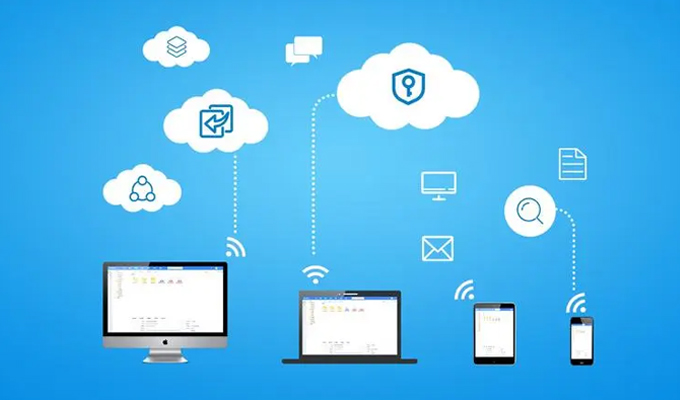
The concept of synchronization refers to, Real time communication between cloud and local folders, continuity, Automatic data synchronization. That is to say, When we add, When modifying or deleting files, The cloud disk client will automatically synchronize these operations to the cloud, Ensure file consistency and real-time updates. And when we log in to the same cloud disk account on other devices, You can also see the latest file version, Realized data synchronization and sharing between multiple devices.
Cloud disk that supports synchronizationIt has the following advantages:
1. Save time and worry. Traditional synchronization methods require manual copying, Relatively cumbersome; Using synchronized cloud disks does not require manual intervention, Will automatically complete data synchronization, Greatly saves time and energy.
2. Automated updates. Synchronized cloud disks can automatically update the content in folders, This means that all devices can access the latest version of the file, And manual updates are no longer required.
3. Multi device sharing. Simply install synchronized cloud disk clients on different devices and log in to the same account, You can synchronize and share files between different devices.
4. Safe and reliable. Cloud disk supporting synchronization based on cloud computing technology, With data backup, Fault tolerance and recovery functions, It can ensure that data is not lost in unexpected situations.
5. Efficient office work. Synchronized cloud disks improve collaboration and communication efficiency, Can workFile sharingTo other colleagues, Collaborative completion of tasks.
that, How to choose a user-friendly cloud disk that supports synchronization?
first, We need to consider the following points:
1. Security. Cloud disks require security encryption measures to ensure data security, for example SSL encryption, Prevent Data breach.
2. capacity. Cloud disk needs sufficient storage space, Suitable for storing personal and corporate files, For example, photos, personal data, Documents, etc, Ensure sufficient capacity.
3. Upload speed. Considering the speed of uploading files, And synchronization speed with other devices, Need to select a cloud disk that supports high-speed upload and synchronization.
4. Support for multiple platforms. Different devices need to be able to easily access andsynchronize files, So we need to choose cloud disks that support multiple platforms.
5. Price and Service. Different cloud disk service providers have different prices, Need to choose a cloud disk with higher cost-effectiveness, And pay attention to the after-sales service provided by the service provider.
Based on the above evaluation points, Here are some recommended cloud disks that support synchronization:
1. Baidu Cloud. Baidu Cloud Disk can be easily uploaded, Download and access files. The synchronization function of this product further improves user productivity, Allowing you to access your files anytime, anywhere, And it also provides a lot of storage space.
2. Dropbox. Dropbox It is a popular Cloud storage service, support Windows, Mac, iOS and Android Waiting for multiple platforms, With intelligent synchronization capability and powerful workflow functions, Automatically recognize and synchronize files on different devices.
3. OneDrive. OneDrive It is a Cloud storage service developed by Microsoft, support Windows, Mac, iOS and Android Waiting for multiple platforms, And Office integration. Adopting Microsoft Azure Technology for, Has high safety and stability.
The above three cloud disks are representative of cloud disks that support synchronization, Can meet the needs of most users.
in short, Cloud disks that support synchronization are very helpful for improving personal and enterprise office efficiency. Choose a cloud disk that suits you, Can help us complete our work more easily and happily, Manage Files, raise productivity, Make life better.
About us
360FangcloudIt is a powerful enterprise document management and team collaboration platform, Supports online editing and preview of multiple file formats, Simultaneously providing full-text search, Multiple convenient functions such as comments and security control. Enterprise users can achieve document collaboration through this platform, Knowledge management and standardized management of data assets, Greatly improving internal and external collaboration efficiency and data security.
-
Classification of this article: Frequently Asked Questions
-
Number of views: 4017 Views
-
Release date: 2023-06-23 10: 00: 24
-
Link to this article: https: //www. fangcloud. com/cms/cjwt/2929. html
-
 7 年管好 900GB 资料, 成都格润建科让 AI 用上 20 年经验
-
 一 3000 人的头部律所, 想给自己留下点 "带不走" 的东西
-
 京新药业携手 360 亿方智能, 共建 AI 知识库, 让医药知识常用常「新」
-
 从 U disc到企业空间, 湖南信佳百货如何留住 30 年零售经验
您可能感兴趣的文章
- 文档解析and OCR 如何影响知识检索? 扫描件And复杂文件评估
- 企业 AI 知识问答如何保障权限? 知识范围And答案核验
- AI 知识库and传统知识库有什么区别? 能力And建设路径对比
- 移动办公如何安全访问企业文件? 设备, 身and文件控制
- 企业文件误删怎么恢复? 回收站, 版本and备策略
- 企业敏感文件如何分级? 密级分类And访问规则设计
- 文件迁移时如何保留原有权限? 权限映射And核对方法
- NAS 文件如何迁移到企业Cloud disk? 目录disc点And分批迁移方案
- 共享disc迁移到企业网disc怎么做? 步骤, 权限and校验方法
- 让每一次反馈都有回应, 某头部咨询服务机构向 360 Fangcloud发来感谢信
Popular recommendations


 企业Cloud disk
 AI 知识库


 浙公网安备 33011002015048 号
 Online service
 Phone consultation