



















improve work efficiency, Creating Convenient Cloud Office: A new solution centered on cloud disk synchronization

This article introduces the use ofCloud disk synchronizationNew solutions at the core, This plan can greatly improve work efficiency, And create a convenient cloud office environment. The article provides detailed explanations from four aspects: Cloud disk synchronizationAdvantages of, Cloud disk synchronizationImplementation method, Cloud diskSynchronized application scenarios andCloud diskSecurity of synchronization. Through the introduction of these aspects, Readers can learn about the specific implementation and application of cloud disk synchronization, And how to ensure data security while using cloud disk synchronization.
1, The advantages of cloud disk synchronization
Cloud disk synchronization is a technical means of real-time synchronization between local folders and cloud based folders, It has the following advantages:
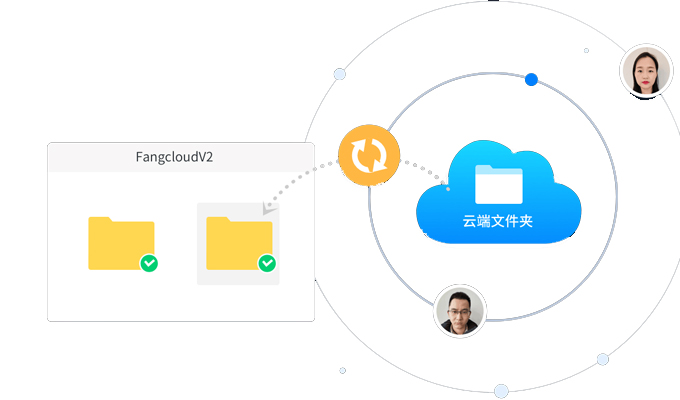
first, Cloud disk synchronization can easily store and back up files, Without the need for tedious manual backup processes. Compared to traditional backup methods, Cloud disk synchronization is more automated and efficient.
secondly, Cloud disk synchronization can achieve multi end synchronization of files. Whether using a computer, Different devices such as mobile phones or tablets, Just log in to the same account, You can easily access andsynchronize files.
in addition, Cloud disk synchronization can also be achievedfile sharingAnd collaboration. Users can share folders with others, And set different permissions, To facilitate collaboration between others and oneself.
2, Implementation method for cloud disk synchronization
There are two main ways to achieve cloud disk synchronization technology: Client synchronization andCloud synchronization.
Client synchronization refers to installing a dedicated cloud disk synchronization client on a user's device, Synchronize local folders with cloud folders through client software. The advantage of this approach is that files can be managed and modified locally, And can access files offline, The disadvantage is that it requires a certain amount of storage space and bandwidth resources.
Cloud synchronizationIt refers to using the cloud disk synchronization function provided by the cloud service provider, Users only need to upload files in the cloud, Can access and on different devicessynchronize files. The advantage of this approach is that it does not require the consumption of local storage space and bandwidth resources, The disadvantage is that it requires reliance on the network and storage resources of cloud service providers.
Comprehensive consideration, Both client synchronization and cloud synchronization have their own advantages and disadvantages, Users can choose according to their own needs and usage habits.
3, Application scenarios for cloud disk synchronization
Cloud disk synchronization can be applied to multiple scenarios, Here are several common application scenarios:
first, Cloud disk synchronization can be used to backup important data. Users can share important photos, Synchronize folders such as documents to the cloud, For recovery in the event of local data loss or corruption.
secondly, Cloud disk synchronization can be used for collaborative work. Team members can synchronize work folders to the cloud, Enable multi person collaboration and version control.
in addition, Cloud disk synchronization can also be used to store commonly used tools and software. Users can store commonly used software and tools in the cloud, Easy to access and use on different devices.
Overall, Cloud disk synchronization can be applied to various scenarios, Provide users with more convenient and efficientfile managementmode.
4, Security of cloud disk synchronization
Cloud disk synchronization not only improves work efficiency and convenience, but also, Attention should also be paid to ensuring data security.
first, Users should choose cloud service providers with good reputation, Ensure the security and reliability of cloud data. secondly, Users should set strong passwords, And enable secondary authentication, Preventing account theft. in addition, Users can also encrypt folders, Protect important files from being accessed by others.
Overall, When users use cloud disk synchronization technology, Need to comprehensively consider efficiency and safety, Choose the appropriate service provider, And take appropriate safety measures, To protect one's own data from infringement.
Through the introduction of this article, We have learned about a new solution centered on cloud disk synchronization, It can improve work efficiency, Implement a convenient cloud office environment. The article discusses the advantages of cloud disk synchronization separately, Implementation method, Detailed explanation of application scenarios and security in four aspects. When using cloud disk synchronization technology, Users need to consider efficiency and safety comprehensively, Choose the appropriate service provider, And take appropriate safety measures. I believe that through the introduction of this article, Readers have learned about the specific implementation and application of cloud disk synchronization, And how to ensure data security while using cloud disk synchronization.
About us
FangcloudEnterprise cloud diskIt is a safe and reliable product, Efficient and stable Cloud storage service. It provides high capacity storage space, Multi device synchronization, Multiple functions such as backup and recovery, Safeguarding Enterprise Data Security. meanwhile, FangcloudAlso provides powerful team collaboration and file management tools, Make internal communication and collaboration within enterprises more convenient and efficient. Whether it's collaboration between internal employees, Cooperation with external partners, Can be easily completed in Yifang Cloud. FangcloudEnterprise cloud diskWill become an integral part of the enterprise's Digital transformation.
-
Classification of this article: Frequently Asked Questions
-
Number of views: 3695 Views
-
Release date: 2023-06-13 10: 01: 14
-
Link to this article: https: //www. fangcloud. com/cms/cjwt/2185. html
-
 7 年管好 900GB 资料, 成都格润建科让 AI 用上 20 年经验
 -
 一 3000 人的头部律所, 想给自己留下点 "带不走" 的东西
 -
 从 U 盘到企业空间, 湖南信佳百货如何留住 30 年零售经验
 -
 京新药业携手 360 亿方智能, 共建 AI 知识库, 让医药知识常用常「新」
您可能感兴趣的文章
- 文档解析和 OCR 如何影响知识检索? 扫描件与复杂文件评估
- 企业 AI 知识问答如何保障权限? 知识范围与答案核验
- AI 知识库和传统知识库有什么区别? 能力与建设路径对比
- 移动办公如何安全访问企业文件? 设备, 身和文件控制
- 企业文件误删怎么恢复? 回收站, 版本和备策略
- 企业敏感文件如何分级? 密级分类与访问规则设计
- 文件迁移时如何保留原有权限? 权限映射与核对方法
- NAS 文件如何迁移到Enterprise cloud disk? 目录盘点与分批迁移方案
- 共享盘迁移到企业网盘怎么做? 步骤, 权限和校验方法
- 让每一次反馈都有回应, 某头部咨询服务机构向 360 Fangcloud发来感谢信
Popular recommendations


 Enterprise cloud disk
 AI 知识库


 浙公网安备 33011002015048 号
 Online service
 Phone consultation