



















Cloud disk network disk sharing: Life changing solutions
With the popularization of the Internet, People's work, learning, Life is becoming increasingly dependent on electronic devices. And with it comes a massive amount of data, The storage of these data, backups, Sharing and other issues are becoming increasingly important. meanwhile, People's Mobile Office, Business trips and other needs also require access to data anytime, anywhere. At this point, Network disk sharing"" Cloud diskNetwork disk sharingBecoming a solution for people.
What isCloud Disk Network Disksharing"" Cloud Disk Network Disksharing?
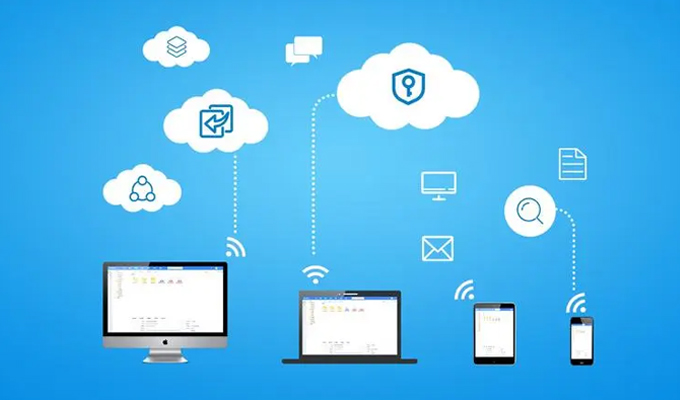
Cloud diskRefers to a virtual disk on a remote server, Users can upload files to cloud disks, Cloud disk is responsible for storing these files, And provide corresponding access permissions. NetdiskIt refers to the virtual disk space stored on internet servers, Users can upload files toNetdiskShare it with others or make it public, You can also download and access the files you need from the network drive.
Cloud disk and online disk have many similarities, But there are also differences. It can be considered that cloud disk places more emphasis on data backup, synchronization, Safety and other aspects, On the other hand, online storage places more emphasis on file sharing, Social, Search and other functions. Currently, in ChinaCommonly used cloud disksBaidu Cloud on Netdisk, Tencent Micro Cloud, Alibaba Cloud disks, etc.
Sharing function centered on cloud and network disks, Enable people to transmit, access, Significant improvements have been made in areas such as sharing, Let's take a closer look at the changes brought about by cloud and network disk sharing.
Change one: Convenient file transfer
Cloud disk and network disk are one of the main ways for modern people to transfer files. When you need to transfer files from one device to another, You can upload files through cloud or online storage, And download the file on another device, This is better than moving U disc, Devices such as hard drives are faster, facilitate.
in addition, Cloud disk and network disk can also provide file synchronization function. This means that, File on device A The modifications made on will also be synchronized to the device B upper. such, If you create a document folder on your phone, So this document folder will also appear on the computer, This allows users to access data anytime, anywhere without worrying about differences between devices.
Change Two: Improve the security of data backup
The sharing function of cloud and network disks not only helps people transfer files, And it can also improve the backup security of data. If you store files on your computer or phone, When the device encounters damage, When lost or experiencing other unpredictable events, Files will also be affected. however, If you upload files to cloud or online storage for backup and storage, Even if the device is damaged, Files can also be securely retained in the cloud.
in addition, Cloud and network disks can also provide the function of backing up historical versions of files. This means that, If you accidentally delete a file, Cloud disk or network disk can restore you to the previous version. Introduction of Historical Version Function, Greatly reduces users' concerns about data security, Make data backup more reliable.
Change Three: Improve the efficiency of multi person collaboration
The sharing function of cloud and network disks can also help multiple people collaborate, improve work efficiency. If you want to share a file with colleagues or friends, You can upload the file to cloud or online storage, And set corresponding access permissions, If read-only, Editable or downloadable permissions. This file is also open to others, And can collaborate simultaneously, This can greatly improve work efficiency.
in addition, Cloud and online disks can also provide group functions. This means that, You can combine multiple users into a team, Create a folder and set access permissions. All members within the team can see, Edit and download this folder. This feature is very useful in team collaboration and project management.
epilogue
Cloud disk and network disk sharing as an important way for modern people to store and share data, Bringing many conveniences and changes to people. People are on the computer, mobile phone, Accessing files on terminal devices such as tablets, Backup data, Collaborative work, These functions enable data exchange between devices, Seamless transmission, Providing a more efficient environment for modern people, Intelligent way of information processing and management.
About us
FangcloudEnterprise cloud diskHaving multiple security measures, Including multiple encryption, Backup recovery, etc, Can ensure data security for enterprises. It not only provides high-quality data management services, It can also ensure the security and stability of enterprise data, It is one of the best choices for enterprises to carry out Digital transformation.
-
Classification of this article: Frequently Asked Questions
-
Number of views: 3217 Views
-
Release date: 2023-06-12 10: 02: 10
-
Link to this article: https: //www. fangcloud. com/cms/cjwt/2127. html
-
 一 3000 人的头部律所, 想给自己留下点 "带不走" 的东西
-
 京新药业携手 360 亿方智能, 共建 AI 知识库, 让医药知识常用常「新」
-
 7 年管好 900GB 资料, 成都格润建科让 AI 用upper 20 年经验
-
 从 U disc到企业空间, 湖南信佳百货如何留住 30 年零售经验
您可能感兴趣的文章
- 文档解析和 OCR 如何影响知识检索? 扫描件与复杂文件评估
- 企业 AI 知识问答如何保障权限? 知识范围与答案核验
- AI 知识库和传统知识库有什么区别? 能力与建设路径对比
- 移动办公如何安全access企业文件? 设备, 身和文件控制
- 企业文件误删怎么恢复? 回收站, 版本和backups策略
- 企业敏感文件如何分级? 密级分类与access规则设计
- 文件迁移时如何保留原有权限? 权限映射与核对方法
- NAS 文件如何迁移到Enterprise cloud disk? 目录disc点与分批迁移方案
- sharingdisc迁移到企业Netdisk怎么做? 步骤, 权限和校验方法
- 让每一次反馈都有回应, 某头部咨询服务机构向 360 Fangcloud发来感谢信
Popular recommendations


 Enterprise cloud disk
 AI 知识库


 浙公网安备 33011002015048 号
 Online service
 Phone consultation