



















[Workplace Xiaobai use and share] Fangcloud, Let me work, Make no mistake in learning
Xiaoyu is a business assistant intern in an Internet company, Every Monday, three, V. working in the company, Work content: mainly responsible for helping VIP Customer service consultants do contract registration, to examine, file, Collection inquiry and cooperation of various business processes, etc.

"Small fish, Let me see if there is any payment? "
"Small fish, this XX The order of the company helps me see whether it is open? "
"Small fish, this XX Can the contract of the company be sent to me before work? "
"Small fish, . . . "
First day of employment, As a good student just out of the university campus, No work experience, Facing various demands from colleagues, Little fish are often confused: Because it is not clear where each document is placed, It takes time to find it, Lack of understanding of each demand process, As a result, it is time-consuming to repeatedly communicate needs with consultants, Inefficient and often self doubt.
But in useFangcloudafter, These trivial problems have been solved: It was originally time-consuming and laborious, and it took two hours of overtime to complete it "Find information, Filling requirements, Send documents" The operation can be completed in half a day now, Work efficiency has been significantly improved, At the same time, there is more time to complete new requirements, Unlock new skills.
that, For novice fish in the workplace, How did she get throughFangcloudStep out of inefficient misconceptions, What about those who achieve rapid growth in the workplace?
Bid farewell to inefficiency
Start by changing the way you work
Internet enterprises attach great importance to internal information construction, Therefore, every employee must have office efficiency improvement tools, Enterprises where Xiaoyu joined are no exception: First day of employment, Xiaoyu found that his colleagues were working with Yifang cloud, Find file, Look at the document, Sending documents and so on are all carried out on it. Because of the first contact with office software, Little fish doesn't know how to use it, So at first, it was mainly through wechat, QQ, Communicate with colleagues in traditional ways such as email, transfer files.
But after two days of self exploration and seeking help, Little fish will master the essentials, And reverse the working method at the first time, The efficiency of cooperation with colleagues has also been rapidly improved.
The following are the skills Xiaoyu shared with newcomers in the workplace, At the same time, it is also the way of its own rapid growth:
Self learning
Initial experience of office software, Start with the help center
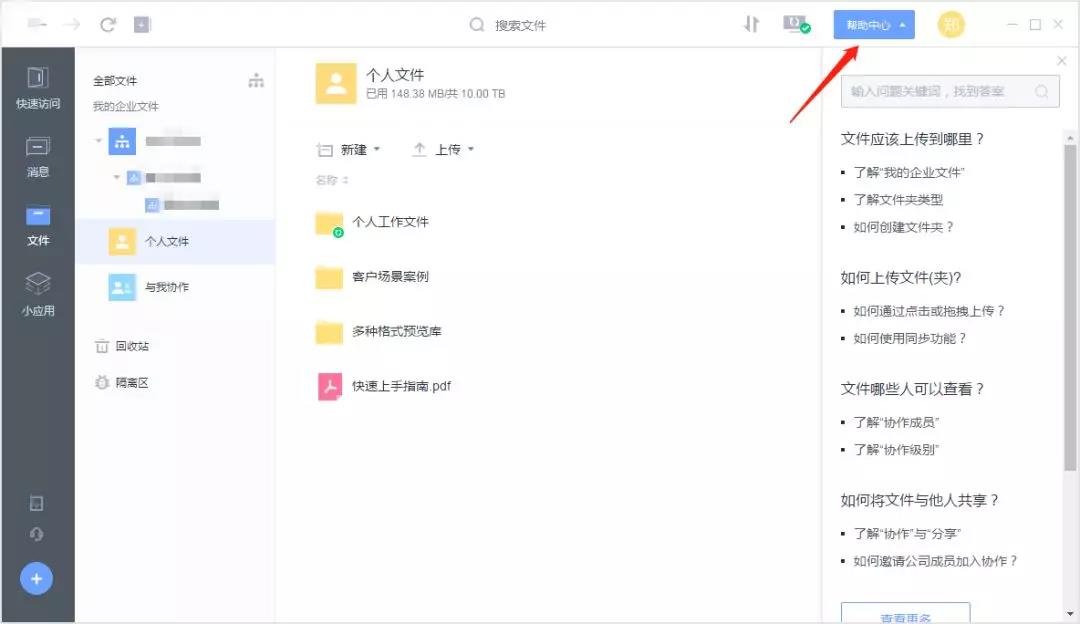
Because it is the first time to contact office software, After logging into Yifang cloud, I first click the help center in the upper right corner, Finish reading "Where should the file be uploaded? " , "How to upload a folder? " , "How to share with others? " After the detailed answers to common questions, Have a general understanding of the operation method of Yifang cloud.
file management
1. Upload local files
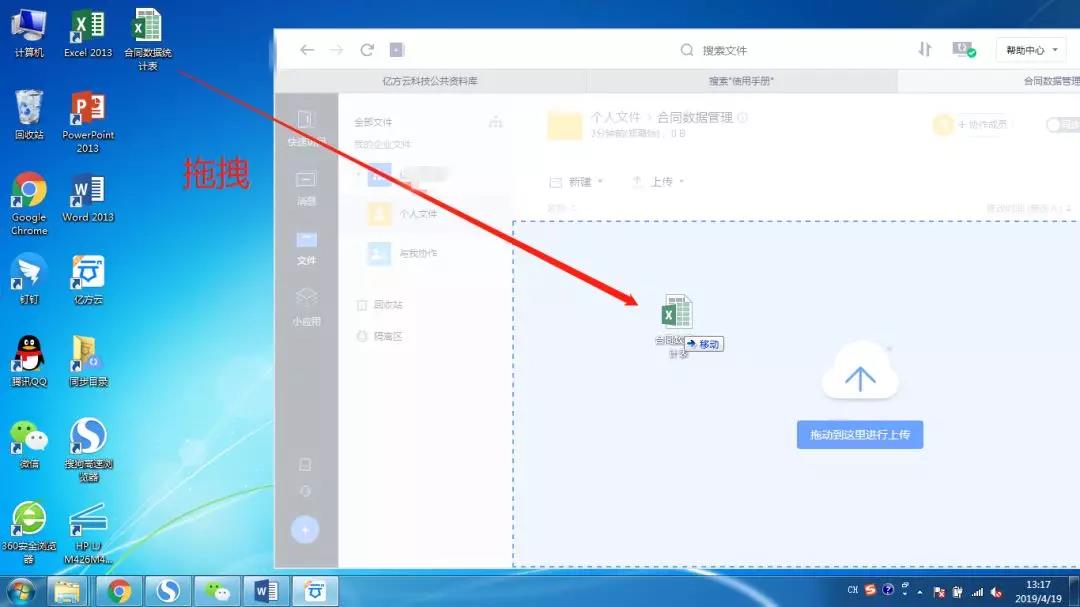
first, I will upload all kinds of files originally stored locally to the designated directory on Yifang cloud, For example, create it under your personal folder first "Contract data management" folder, Local "Statistical table of contract data" Upload to this folder.

[Quick tips] File upload in addition to traditional "upload—Select file—confirm" In addition to the method, you can also drag and upload directly
2. Synchronize important information
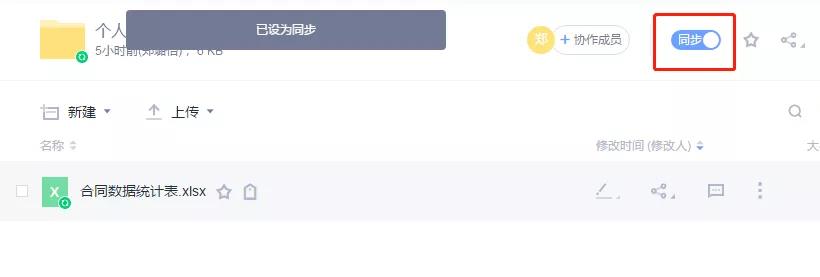
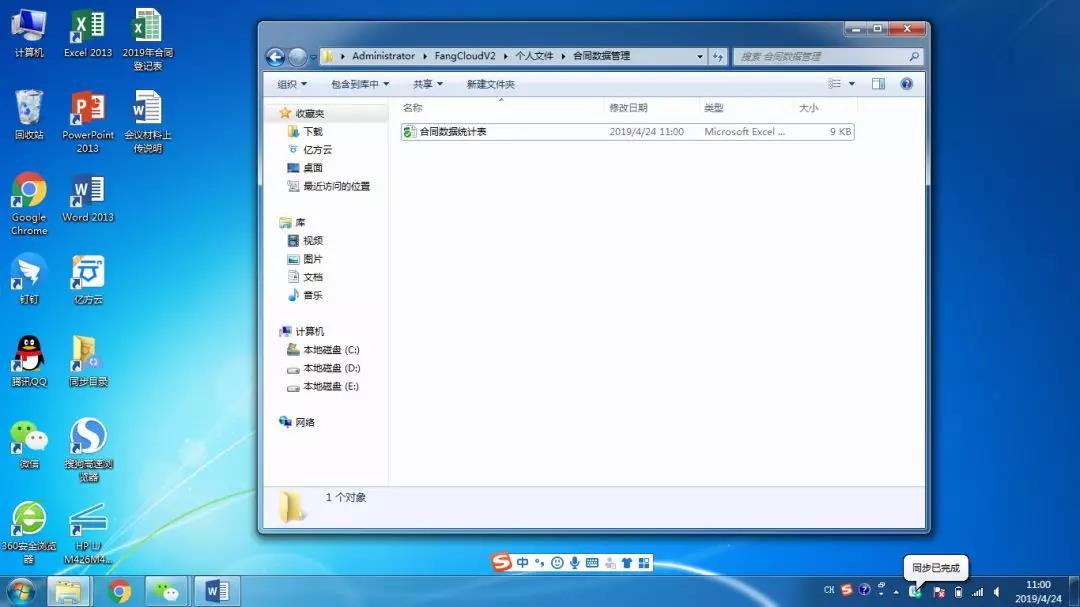
Due to the habit of editing files locally on the computer, So like contract data statistics, Order records and other documents that need daily statistics will be synchronized on Yifang cloud. "Navigate to the important document interface—Click the sync button" after, It can realize real-time backup locally and in the cloud. And the specific local storage location, Can customize settings.
Open the corresponding file under the local synchronization folder, After modification and saving, It will be automatically uploaded to the cloud backup immediately.
3. Add common files
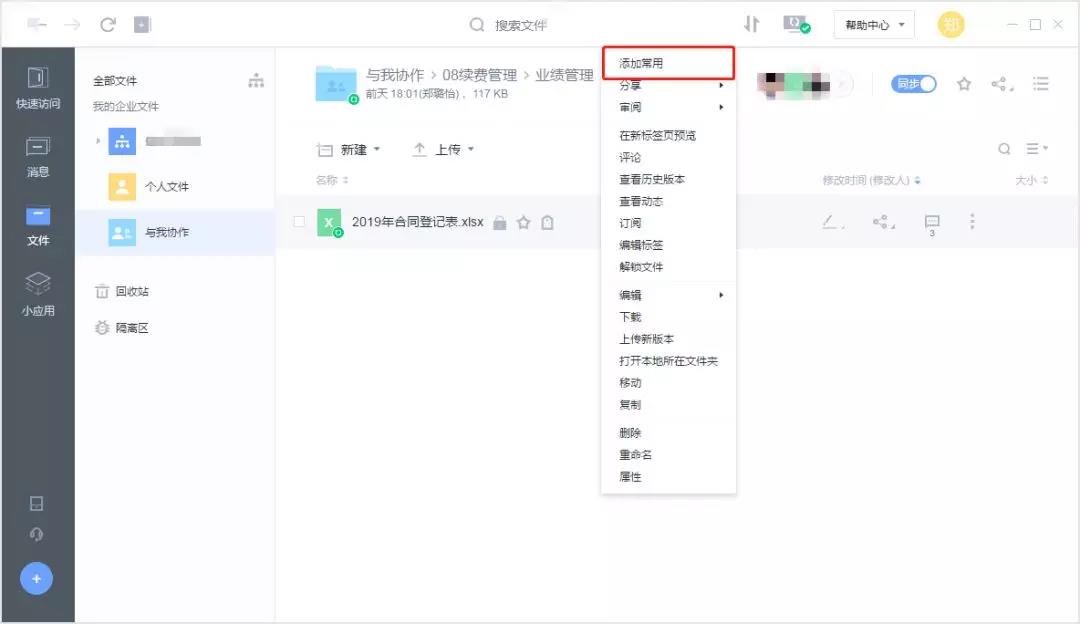
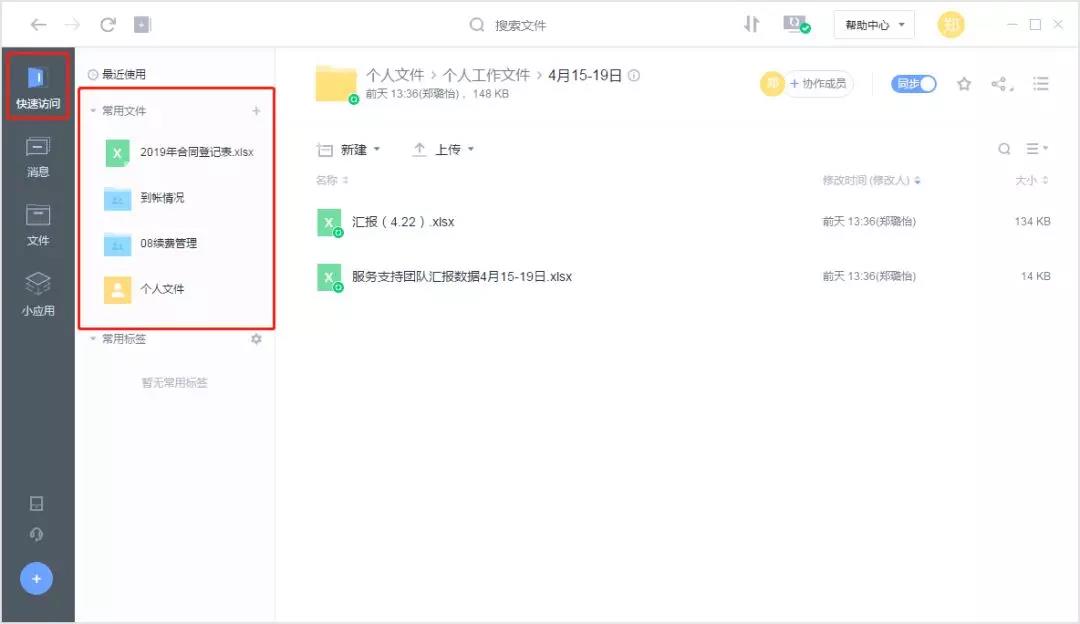
And for the most commonly used files, I'll right-click to add favorites, So you can be seen at the first time under the fast entrance, Convenient and quick access in the future.
After adding common files, they will be displayed under the quick entry, Facilitate subsequent quick access.
Teamwork
As a business assistant, Me and all VIP Customer service consultants belong to the same group [VIP Service Department] , Usually, most of the collaboration scenarios are also carried out with consultants.
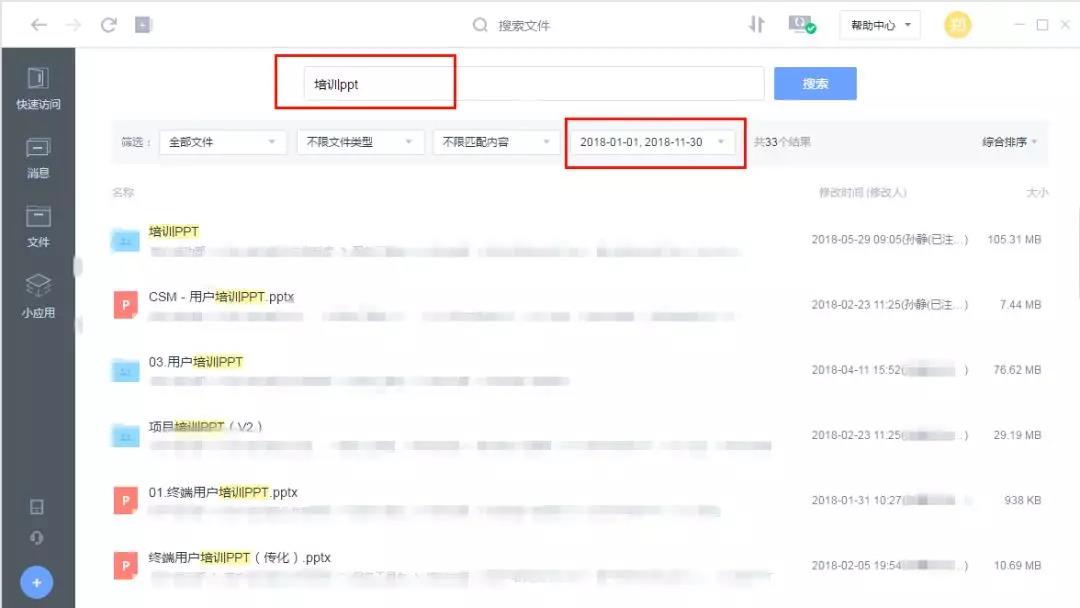
Scenario 1: 1 Training for customers years ago PPT, How to quickly find and send it to consultants?
1. Full text search
In Yifang cloud, By searching for keywords "train PPT" , And make custom settings for the time, Can make a quick search.
2. Online preview
After fuzzy search, Many related files may appear on the interface. At this time, you can confirm whether it is the required target file by online preview.
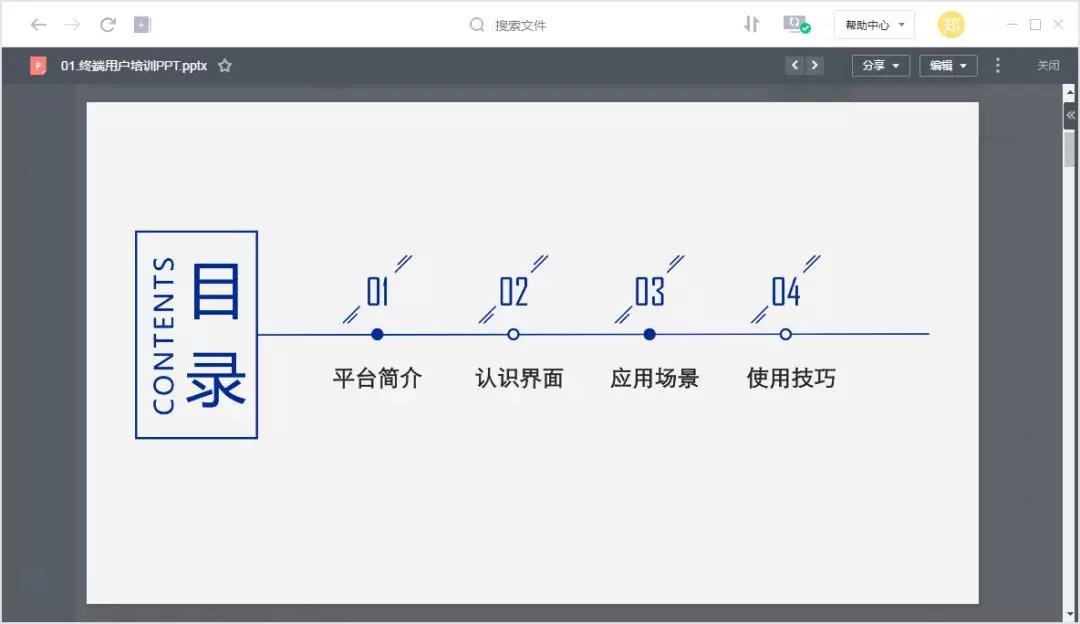
(Yifang cloud support 100+Online preview of files in different formats, frequently-used Offic, PDF And special PSD, DWG, AI All support)
3. File sharing
After determining the specific documents, Optional "Share with colleagues" Directly send or "Share via link "After generating the link, wechat will send it to relevant consultants.
Scenario 2: The supervisor urgently needs all contract data summary information, How to make statistics quickly?
Information related to contract data is generally kept by the corresponding customer service consultant, Therefore, all consultants are required to participate in the information filling.
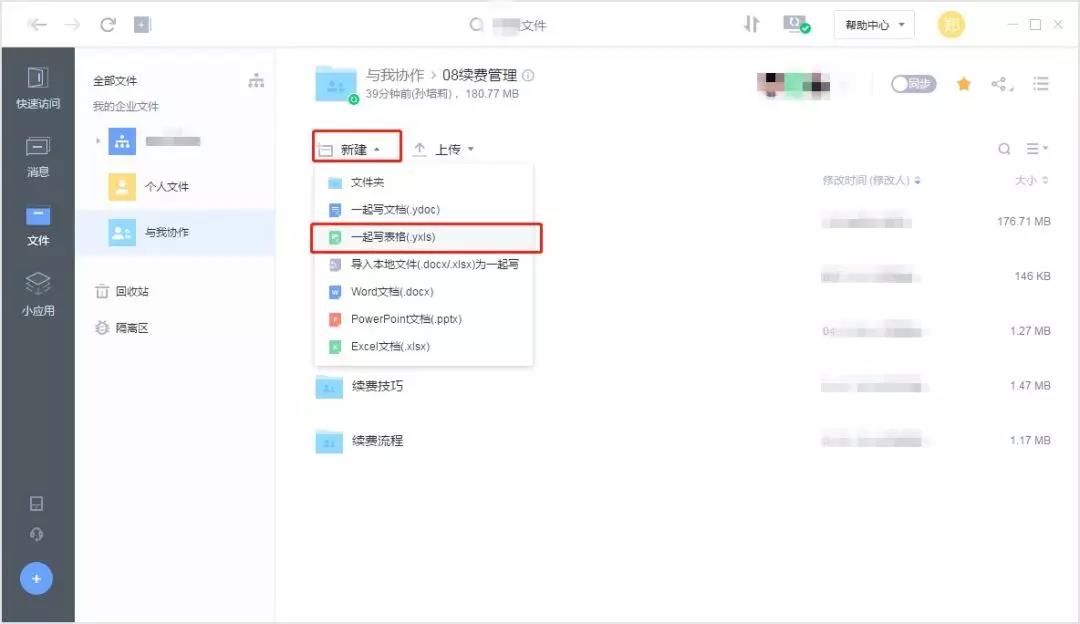
1. Create and write forms together
first, I will be in yifangyun [VIP Service Department] New under department folder "Statistical table of contract data" Write forms together, Let all consultants participate in the filling.

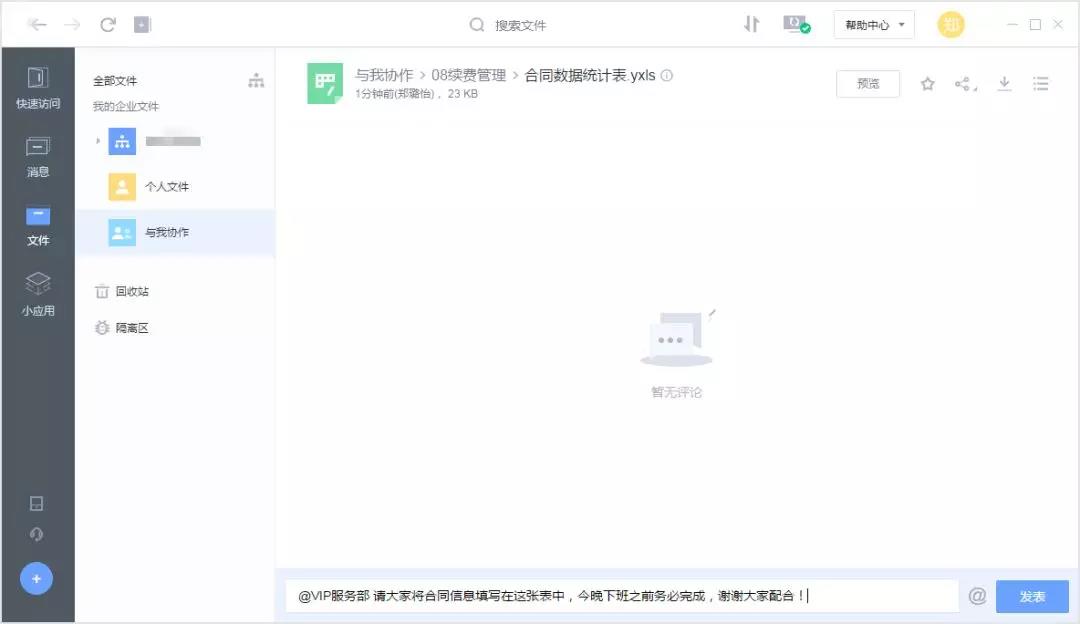
2. Comments section@Related colleagues
After the contract data statistical table is established, Add comments below to inform the consultants of the precautions and specific deadline for filling in the form, and@Related members.
in addition, Because Yifang cloud has the ability of multi terminal synchronization, Xiaoyu can also log in to Yifang cloud by mobile phone or computer during school, see, Promote relevant work tasks, Even if it's only once a week, three, Five or three days in the company, Can also complete their own work efficiently, Achieve learning, Work without error.
If you are the same as the fish, Is plagued by inefficient working methods, Welcome to Yifang cloud, Let's help you: Say goodbye to the wrong way of working, Become an efficient worker!
-
Article classification: Customer story
-
Article label:
-
Number of views: 8198 Browse times
-
Release date: 2019-06-17 16: 08: 24
-
Article link: https: //www. fangcloud. com/cms/khgs/419. html
-
 华诺科技与 360 Fangcloud达成战略合作, 共推 AI 大模型产业化落地
 -
 360 Fangcloud AI 增值服务上线, 超大限时优惠等你来!
 -
 Introduction of listed companies controlled by central enterprises 360 FangCloud Enterprise Online Disk, Build a smart collaborative cloud platform
 -
 中国水利水电第七工程局, 北京石油化工学院等签约 360 Fangcloud
您可能感兴趣的文章
- 360 Fangcloud关于全面落实人工智能生成内容标识与Administration的重要通知
- 360 Fangcloud×DeepSeek-R1 满血版, 提效新选择, 免费领取会员权益!
- 如何选择适合enterprise需求的优质file store共享平台?
- 如何选择适合enterprise需求的公司file storeAdministrationSoftware?
- enterprise级私有file storesystem如何提升enterprise数据与Administration效率?
- 如何选择适合enterprise需求的公司file storeAdministrationSoftware?
- 哪款好用的网盘适合日常file store和分享?
- 有什么好的共享网盘吗? 适合Teamwork和file store的选择有哪些?
- 选择哪好用的网盘更适合日常file store与分享?
- 在众多共享网盘中, 共享网盘哪好更适合file store与分享?
Popular recommendations
- 360 Yifang cloud assistance 500 Strengthening enterprise Jingke energy to realize multi place efficient collaboration
- 华诺科技与 360 Fangcloud达成战略合作, 共推 AI 大模型产业化落地
- 360 Fangcloud AI 增值服务上线, 超大限时优惠等你来!
- Introduction of listed companies controlled by central enterprises 360 FangCloud Enterprise Online Disk, Build a smart collaborative cloud platform
- 江苏霍普律师事务所携手 360 Fangcloud, 提升案件协作效率
- 中国水利水电第七工程局, 北京石油化工学院等签约 360 Fangcloud
- 中国酒业巨头introduce 360 FangCloud Enterprise Online Disk, 安全Administration文件, 团队高效协同
- 中国人民university, 中国科学院university等众多客户签约 360 Fangcloud
- Facilitate digital transformation, 3 Manufacturing enterprises 360 Yifang Cloud efficient collaborative office
- 天津医科university总医院: 借助 360 Fangcloud实现文件安全Administration

最新推荐
- ISC. AI. 2026: 数智化-型资料合集
- 中国信通院: enterprise级智能体技术与应用研究报告 (2026 year)
- 走向 Agent-Native! 360AI 知识库打通业务底座, 让人与 AI 自然协同
- 告别重复劳动, Fangcloud如何让多律所跑出「AI 加速度」?
- OpenClaw x Fangcloud Skill: 用 OpenClaw 调教出的 "AI 团队" , 比我本人还卷
- OpenClaw × Fangcloud|能干活, 有记忆, 懂业务, 这才是enterprise想要的 "数字员工"
- 航空 AI 白皮书发布, 重塑航空未来, 让知识成为生产力
- 360 亿方智能 : 航空 AI 白皮书
- 智慧升级, 教育革新: 200+高校选择 360 Fangcloud, 共绘智慧校园蓝图
- Appear 2024 AI+研发数字 (AiDD) 峰会, 360 智能文档云引领行业 AI 生态建设

 Enterprise cloud disk
 AI 知识库


 浙公网安备 33011002015048 号
 Online service
 Phone consultation