



















[Operation guide] How to use the synchronization function?
When you have a lot of documents (Clip) When it needs to be downloaded locally or uploaded to the cloud, It is recommended to use the synchronization function. The synchronization function allows you to synchronize your local files (Clip) Keep real-time updates with the cloud.
First step: Download and install full client. Click download client
reminder: Due to synchronized files (Clip) May take up a large space, It is recommended that after installation, choice D Disk or other non C Disk path setting local synchronization folder.
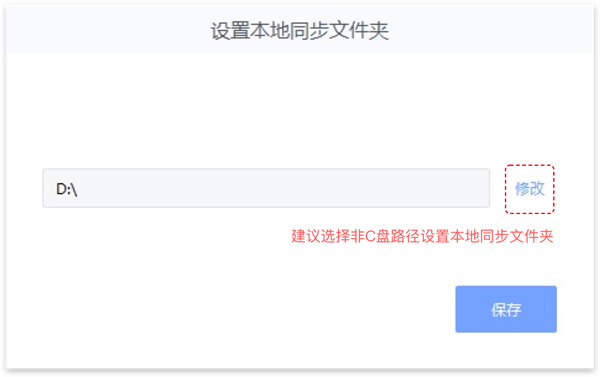
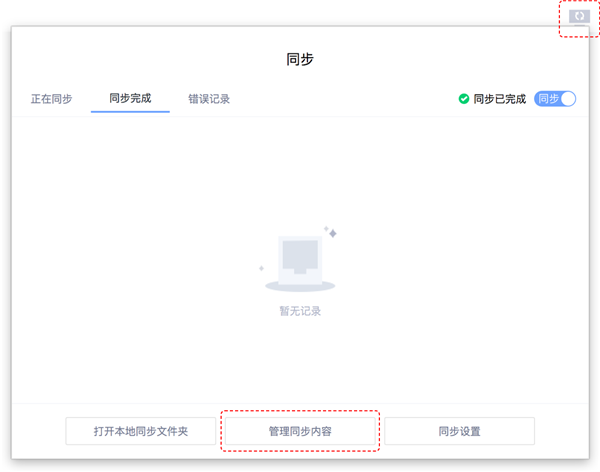
Step 2: Open full function client, On the top bar of the client, click "synchronization" Button.

Step 3: In the expanded synchronization pop-up, choice "Manage synchronized content" Button.
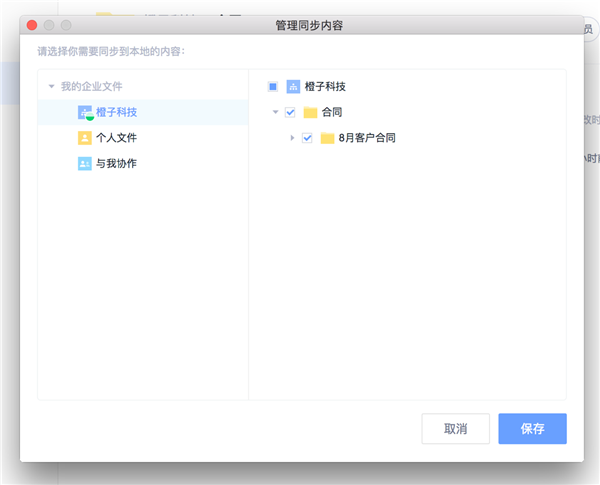
Step 4: In the manage synchronized content pop-up box, After checking the folder you need to sync, click "preservation" Button.
reminder: The time required for synchronization is proportional to the number of synchronized files, It is recommended to select the files you need for synchronization.
thus, Files in the cloud will be gradually synchronized to the local synchronization folder.
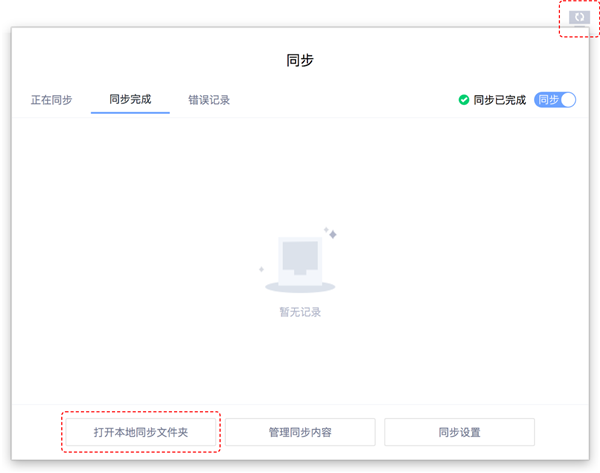
Step 5: Open local sync folder, Select the appropriate subfolder, Upload files to the cloud (Clip) Drag in, These folders will be automatically uploaded to the cloud.
More detailed operation steps, Click on the small video: How to synchronize local and cloud
-
Article classification: Industry information
-
Article label:
-
Number of views: 5075 Browse times
-
Release date: 2018-12-10 15: 21: 46
-
Article link: https: //www. fangcloud. com/cms/hyzx/441. html
-
 华诺科技与 360 Fangcloud达成战略合作, 共推 AI 大模型产业化落地
 -
 360 Fangcloud AI 增值服务上线, 超大限时优惠等你来!
 -
 Introduction of listed companies controlled by central enterprises 360 FangCloud Enterprise Online Disk, Build a smart collaborative cloud platform
 -
 中国水利水电第七工程局, 北京石油化工学院等签约 360 Fangcloud
您可能感兴趣的文章
- 360 Fangcloud关于全面落实人工智能生成内容标识与Administration的重要通知
- 360 Fangcloud×DeepSeek-R1 满血版, 提效新choice, 免费领取会员权益!
- 如何choice适合enterprise需求的优质file store共享平台?
- 如何choice适合enterprise需求的公司file storeAdministrationsoftware?
- enterprise级私有file storesystem如何提升enterprise数据与Administration效率?
- 如何choice适合enterprise需求的公司file storeAdministrationsoftware?
- 哪款好用的网盘适合日常file store和分享?
- 有什么好的共享网盘吗? 适合团队协作和file store的choice有哪些?
- choice哪好用的网盘更适合日常file store与分享?
- stay众多共享网盘中, 共享网盘哪好更适合file store与分享?
Popular recommendations
- 360 Yifang cloud assistance 500 Strengthening enterprise Jingke energy to realize multi place efficient collaboration
- 华诺科技与 360 Fangcloud达成战略合作, 共推 AI 大模型产业化落地
- 360 Fangcloud AI 增值服务上线, 超大限时优惠等你来!
- Introduction of listed companies controlled by central enterprises 360 FangCloud Enterprise Online Disk, Build a smart collaborative cloud platform
- 江苏霍普律师事务所携手 360 Fangcloud, 提升案件协作效率
- 中国水利水电第七工程局, 北京石油化工学院等签约 360 Fangcloud
- 中国酒业巨头introduce 360 FangCloud Enterprise Online Disk, securityAdministration文件, 团队高效协同
- 中国人民university, 中国科学院university等众多客户签约 360 Fangcloud
- Facilitate digital transformation, 3 Manufacturing enterprises passed 360 Yifang Cloud efficient collaborative office
- 天津医科university总医院: 借助 360 Fangcloud实现文件securityAdministration

最新推荐
- ISC. AI. 2026: 数智化-型资料合集
- 中国信通院: enterprise级智能体技术与应用研究报告 (2026 year)
- 走向 Agent-Native! 360AI 知识库打通业务底座, 让人与 AI 自然协同
- 告别重复劳动, Fangcloud如何让多律所跑出「AI 加速度」?
- OpenClaw x Fangcloud Skill: 用 OpenClaw 调教出的 "AI 团队" , 比我本人还卷
- OpenClaw × Fangcloud|能干活, 有记忆, 懂业务, 这才是enterprise想要的 "数字员工"
- 航空 AI 白皮书发布, 重塑航空未来, 让知识成为生产力
- 360 亿方智能 : 航空 AI 白皮书
- 智慧升级, 教育革新: 200+高校choice 360 Fangcloud, 共绘智慧校园蓝图
- Appear 2024 AI+研发数字 (AiDD) 峰会, 360 智能文档云引领行业 AI 生态建设

 Enterprise cloud disk
 AI 知识库


 浙公网安备 33011002015048 号
 Online service
 Phone consultation