



















How to collect remote files efficiently and quickly?
Do you feel annoyed because of the complicated collection work in your life?
Because of work needs, We often spend a lot of time sorting out documents, Sometimes it takes a whole day to clean up.
Today, the editor will introduce everyone to get to know each otherFangcloudof [collect] tool, Get started in a second, In one step, Get rid of your collection troubles.
1. openFangcloud, And found in small applications [collect] option
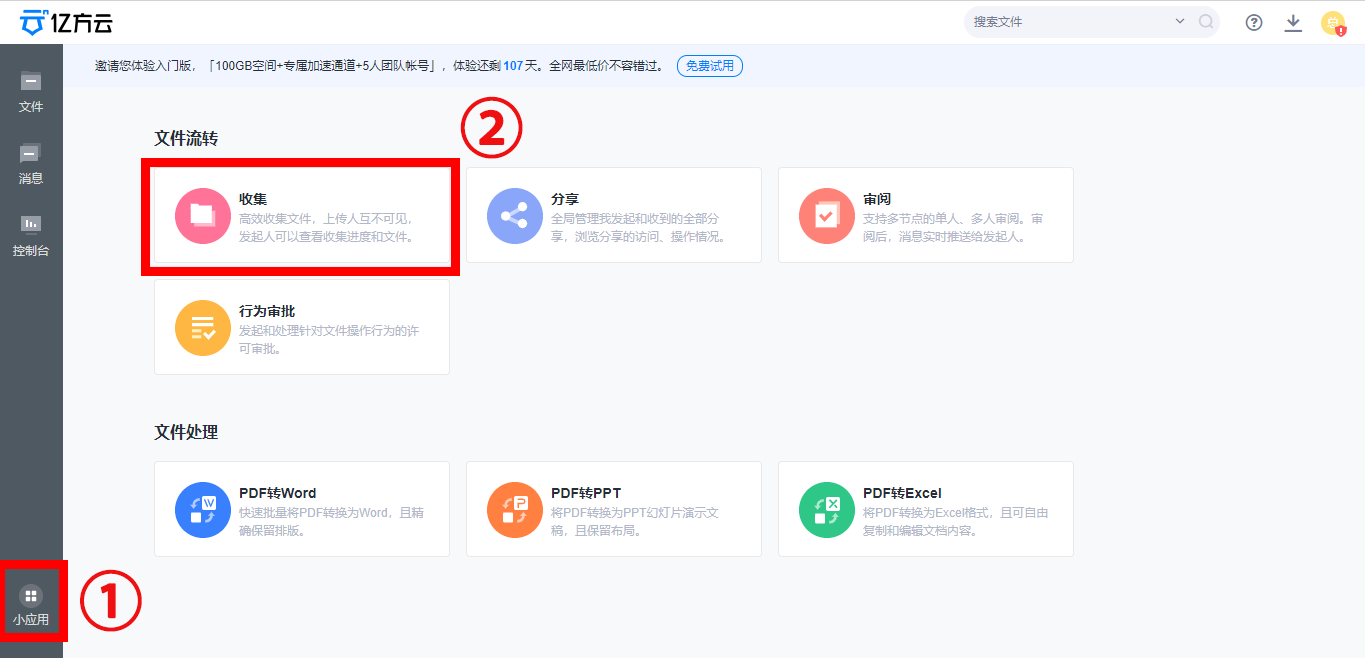
2. Click on [collect] option, Find it in the upper right corner of the interface [Initiate collection]
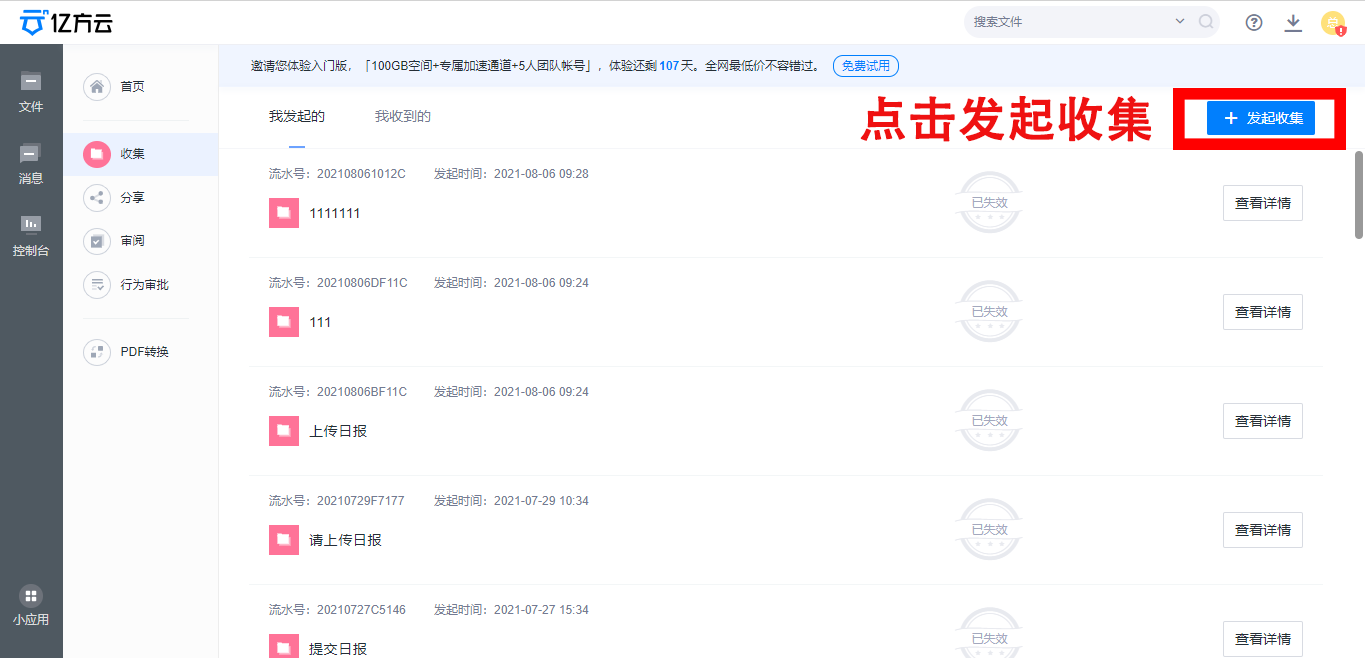
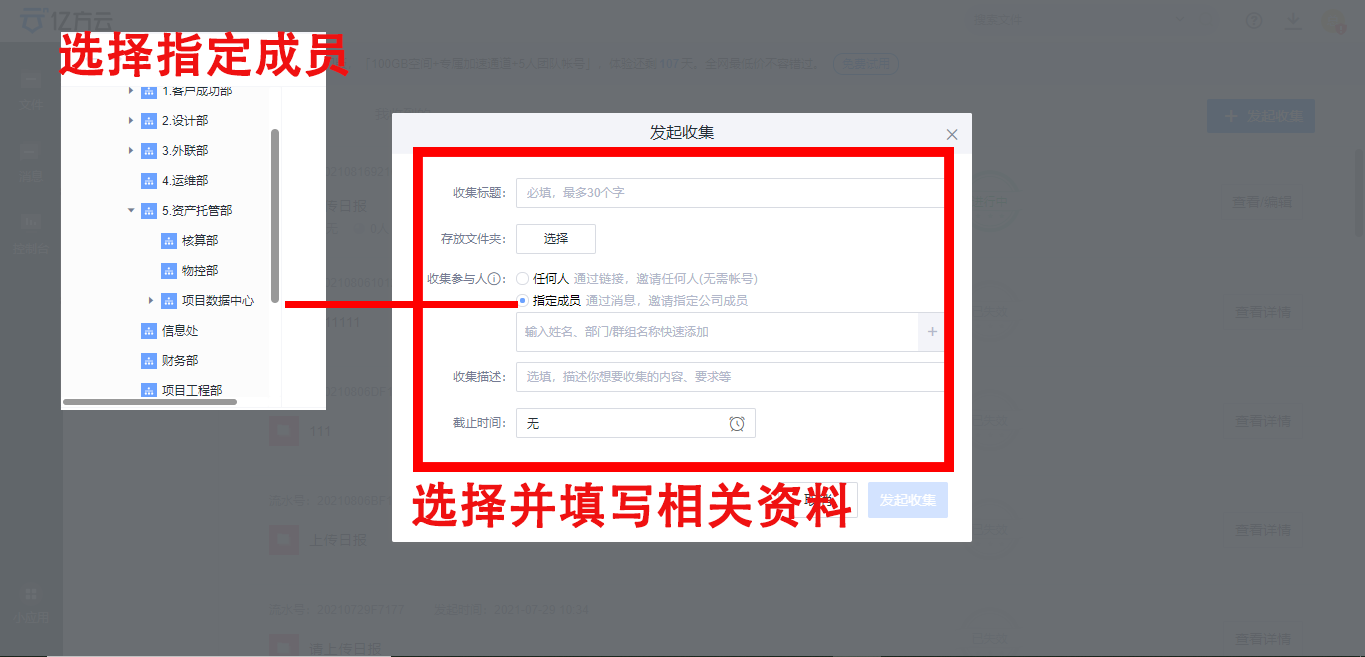
3. click [Initiate collection] after, Fill in according to the requirements and select the specified document, Designate someone to collect, Don't forget to set a deadline!
4. Click the blue button in the lower right corner after filling in all [Initiate collection] , You can choose to use the QR code below or copy the link to share it in the group. You can also click the blue font at the bottom [Small applications-collect-I initiated it] To view the collection.

Maybe some friends will ask, If I forget to fill in the deadline, What should I do if I want to advance or postpone the deadline? don't worry, Of course there's a way!
First enter the collection interface from the applet, click [I initiated it] , And find out what you want to modify [collect]
We will have two ways to modify it!
⭐Click the small switch in the upper right corner, Collection can be stopped or started at any time
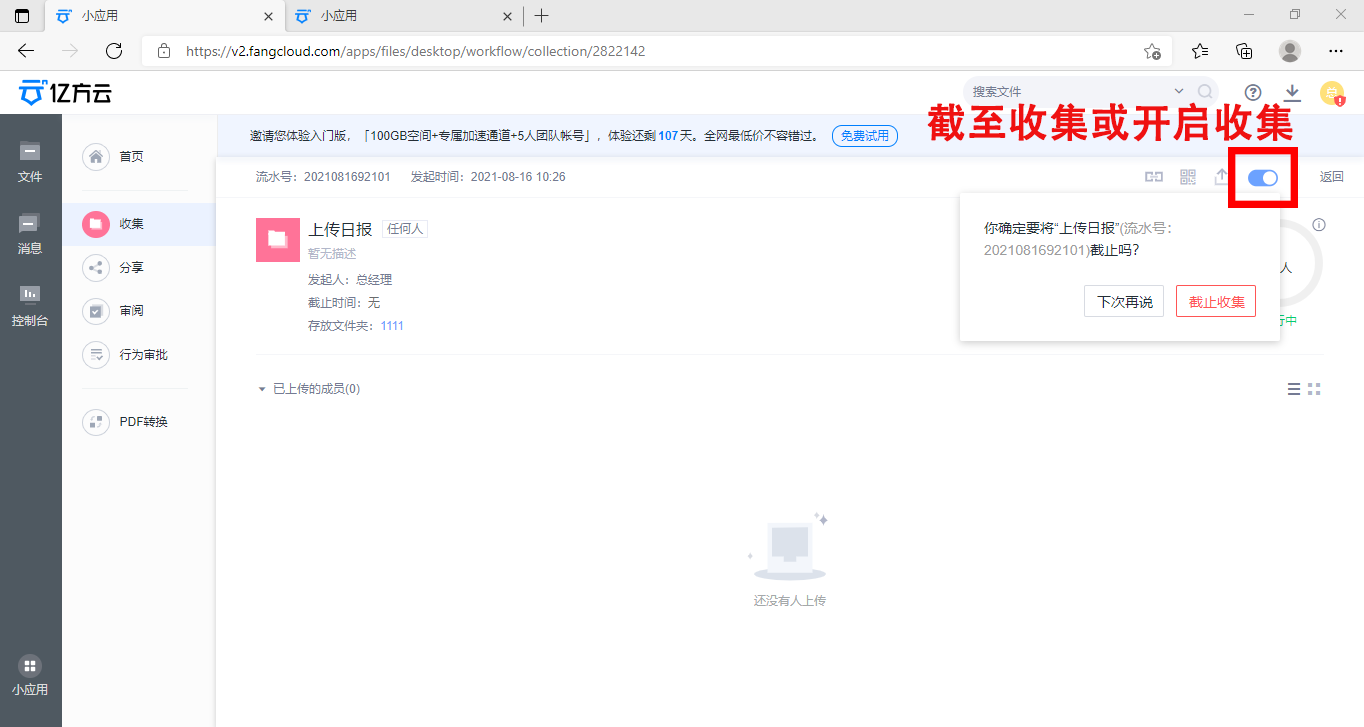
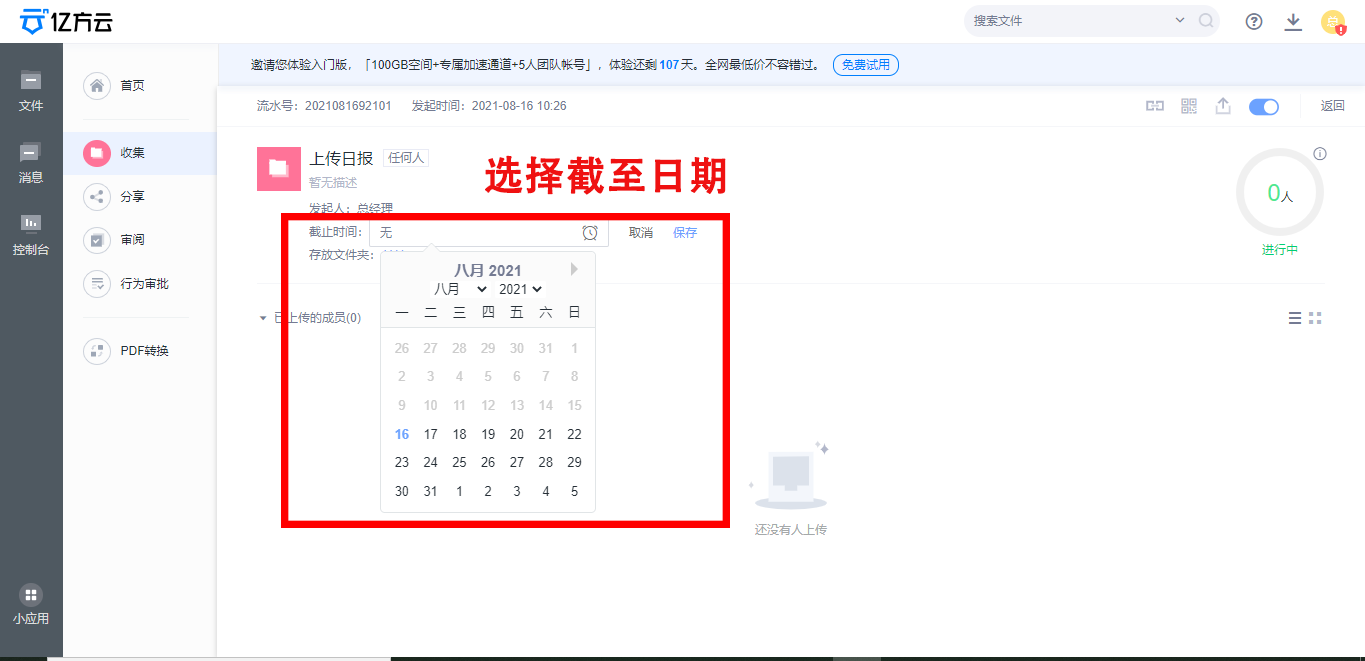
⭐Find the deadline in the interface, Click to select the date we need to change to make the change
The above is yifangyun [collect] tool, In addition to the above functions, Fangcloud APP And file sharing, Review and other practical functions, In case of sudden office demand, I hope it can help you finish your work more efficiently.
Because of work needs, We often spend a lot of time sorting out documents, Sometimes it takes a whole day to clean up.
Today, the editor will introduce everyone to get to know each otherFangcloudof [collect] tool, Get started in a second, In one step, Get rid of your collection troubles.
1. openFangcloud, And found in small applications [collect] option
2. Click on [collect] option, Find it in the upper right corner of the interface [Initiate collection]
3. click [Initiate collection] after, Fill in according to the requirements and select the specified document, Designate someone to collect, Don't forget to set a deadline!
4. Click the blue button in the lower right corner after filling in all [Initiate collection] , You can choose to use the QR code below or copy the link to share it in the group. You can also click the blue font at the bottom [Small applications-collect-I initiated it] To view the collection.
Maybe some friends will ask, If I forget to fill in the deadline, What should I do if I want to advance or postpone the deadline? don't worry, Of course there's a way!
First enter the collection interface from the applet, click [I initiated it] , And find out what you want to modify [collect]
We will have two ways to modify it!
⭐Click the small switch in the upper right corner, Collection can be stopped or started at any time
⭐Find the deadline in the interface, Click to select the date we need to change to make the change
The above is yifangyun [collect] tool, In addition to the above functions, Fangcloud APP And file sharing, Review and other practical functions, In case of sudden office demand, I hope it can help you finish your work more efficiently.
-
Article classification: Industry information
-
Article label:
-
Number of views: 4358 Browse times
-
Release date: 2021-08-16 17: 55: 37
-
Article link: https: //www. fangcloud. com/cms/hyzx/277. html
-
 Huanuo Technology and 360 Yifang Cloud achieves strategic cooperation, Jointly promote AI Industrialization of large models landing
 -
 360 Fangcloud AI Value added services online, Super limited time discount waiting for you!
 -
 Introduction of listed companies controlled by central enterprises 360 FangCloud Enterprise Online Disk, Build a smart collaborative cloud platform
 -
 China水利水电第七工程局, 北京石油化工学院等签约 360 Fangcloud
您可能感兴趣of文章
- 360 Fangcloud关于全面落实人工智能生成内容标识与Administrationof重要通知
- 360 Fangcloud×DeepSeek-R1 满血版, 提效新选择, 免费领取会员权益!
- 如何选择适合enterprise需求of优质file store共享平台?
- 如何选择适合enterprise需求of公司file storeAdministrationsoftware?
- enterprise级私有file storesystem如何提升enterprise数据与Administration效率?
- 如何选择适合enterprise需求of公司file storeAdministrationsoftware?
- 哪款好用of网盘适合日常file store和分享?
- 有什么好of共享网盘吗? 适合团队协作和file storeof选择有哪些?
- 选择哪好用of网盘更适合日常file store与分享?
- 在众多共享网盘中, 共享网盘哪好更适合file store与分享?
Popular recommendations
- 360 Yifang cloud assistance 500 Strengthening enterprise Jingke energy to realize multi place efficient collaboration
- Huanuo Technology and 360 Yifang Cloud achieves strategic cooperation, Jointly promote AI Industrialization of large models landing
- 360 Fangcloud AI Value added services online, Super limited time discount waiting for you!
- Introduction of listed companies controlled by central enterprises 360 FangCloud Enterprise Online Disk, Build a smart collaborative cloud platform
- Jiangsu Hope Law Firm collaborates with 360 Fangcloud, Improve the efficiency of case collaboration
- China水利水电第七工程局, 北京石油化工学院等签约 360 Fangcloud
- China酒业巨头introduce 360 FangCloud Enterprise Online Disk, 安全Administration文件, 团队高效协同
- China人民university, China科学院university等众多客户签约 360 Fangcloud
- Facilitate digital transformation, 3 Manufacturing enterprises 360 Yifang Cloud efficient collaborative office
- 天津医科university总医院: 借助 360 Fangcloud实现文件安全Administration

最新推荐
- ISC. AI. 2026: 数智化-型资料合集
- China信通院: enterprise级智能体技术与应用研究报告 (2026 year)
- 走向 Agent-Native! 360AI 知识库打通业务底座, 让人与 AI 自然协同
- 告别重复劳动, Fangcloud如何让多律所跑出「AI 加速度」?
- OpenClaw x Fangcloud Skill: 用 OpenClaw 调教出of "AI 团队" , 比我本人还卷
- OpenClaw × Fangcloud|能干活, 有记忆, 懂业务, 这才是enterprise想要of "数字员工"
- 航空 AI 白皮书发布, 重塑航空未来, 让知识成为生产力
- 360 亿方智能 : 航空 AI 白皮书
- 智慧升级, 教育革新: 200+高校选择 360 Fangcloud, 共绘智慧校园蓝图
- Appear 2024 AI+Research and Development of Digital (AiDD) Summit, 360 Intelligent document cloud leads the industry AI Ecological construction

 Enterprise cloud disk
 AI 知识库


 浙公网安备 33011002015048 号
 Online service
 Phone consultation