



















Home / Company news /
Industry information /
Here comes the worry free guide for the beginning of school! 4 Tips to help teachers solve 90%File troubles
Here comes the worry free guide for the beginning of school! 4 Tips to help teachers solve 90%File troubles

But it doesn't matter!
Today, the editor sorted out an issue for all teachers "Easy to start school guide" , Let teachers start school easily, Get through" Document rolling period" ! ! !
Teachers can useCloud diskof [collect] function, One click collection of student information. After that, just wait for the students to upload their homework, The system will automatically summarize the job into the specified folder, No longer need teachers to receive documents one by one.
operation Tips:
1, Select a folder, Right click to initiate "collect" .
2, Links to be generated/Send QR code to class group.
in addition, Teachers can also pass「Designated members」Send a collection invitation to the designated class, Check everyone's homework completion in real time, Remind students who have not uploaded homework in time.
Like large-scale solicitation activities in schools, Items such as the collection of application materials can also be quickly completed through the collection function.
There are many forms that need to be filled out by teachers and students after the beginning of school, But the efficiency of transferring files back and forth is too low, What should we do?
Open CampusCloud disk, Can be in the same document, Realize online editing by multiple people at the same time, See document filling dynamics in real time, The most important thing is that there is no limit to the number of online editors at present! even if 3 Students of classes edit online at the same time, Information collection can also be easily completed!
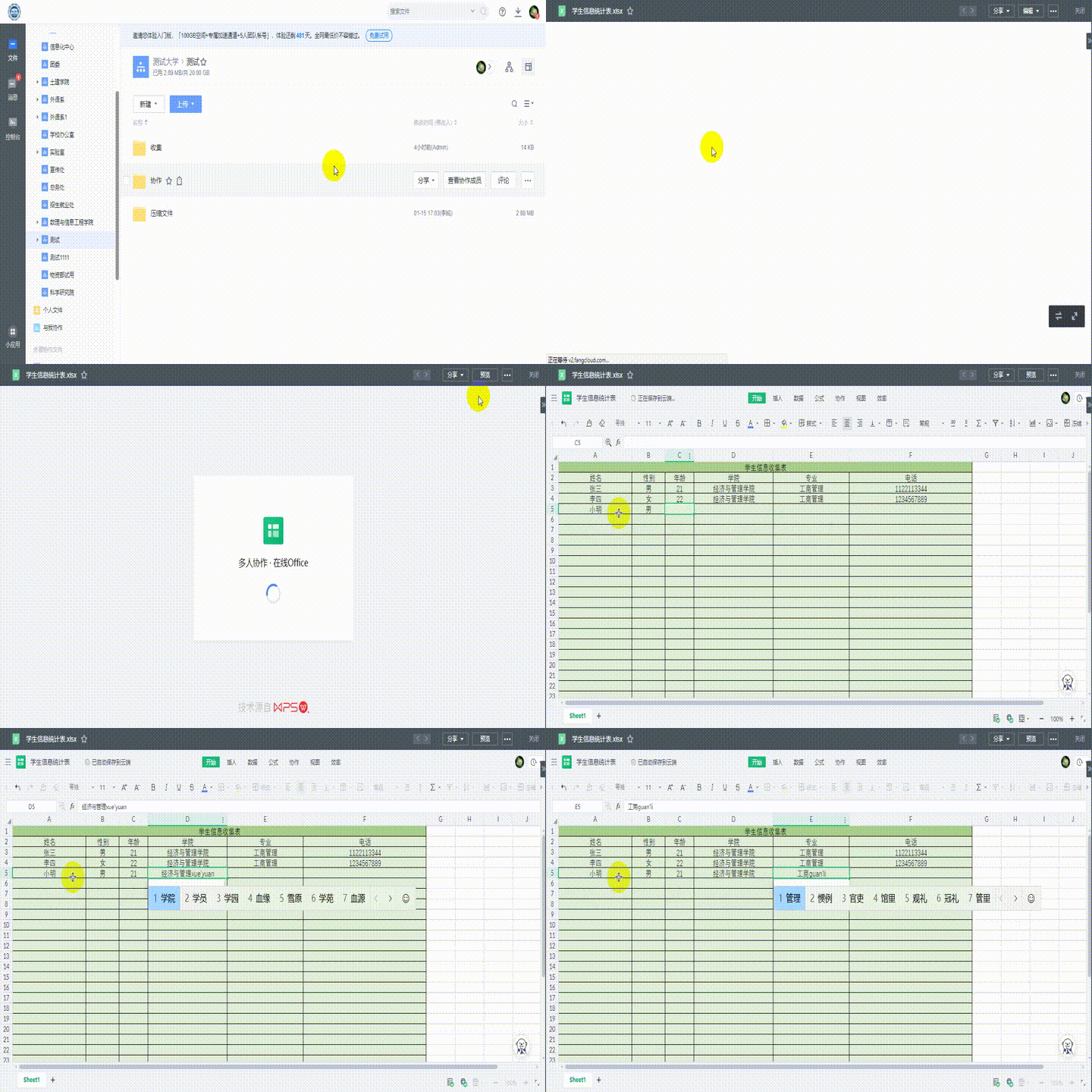
operation Tips:
1, Click to select the document you want to edit.
2, choice Online editing or Local editing Make modifications.
In addition, the campus cloud disk also supports the most 100 Historical versions.
99%All teachers have experienced such scenes:
The students swarmed up after class, All around the podium U Disk copy courseware, A copy is half an hour. . .
Some teachers in order to save time between classes, The courseware will be sent to students by email, But even so, Teachers also need to manually enter email accounts one by one, Time consuming and labor-intensive.
What should we do then! Teachers can make courseware, Upload files to campus cloud disk, Generate shared QR code or link, Then send it to students, Let students download by themselves, And it can also track the shared access in real time, Such as preview and download times.
Remember: Don't send the link to the wrong group~!
and, Under the current background of full coverage of campus network, Teachers don't even have to carry U Disk and computer, Log in to the campus cloud disk directly in the multimedia classroom, Preview and play courseware Online.
I don't know if teachers have ever encountered such a situation, With courseware U The disc is lost, Or forget it in the classroom, If you're lucky, you can find it, If unfortunate, The hard-working courseware is all gone! ! !
In order to avoid such problems, Teachers can synchronize courseware to campus cloud disk, So you don't have to worry about file backup.
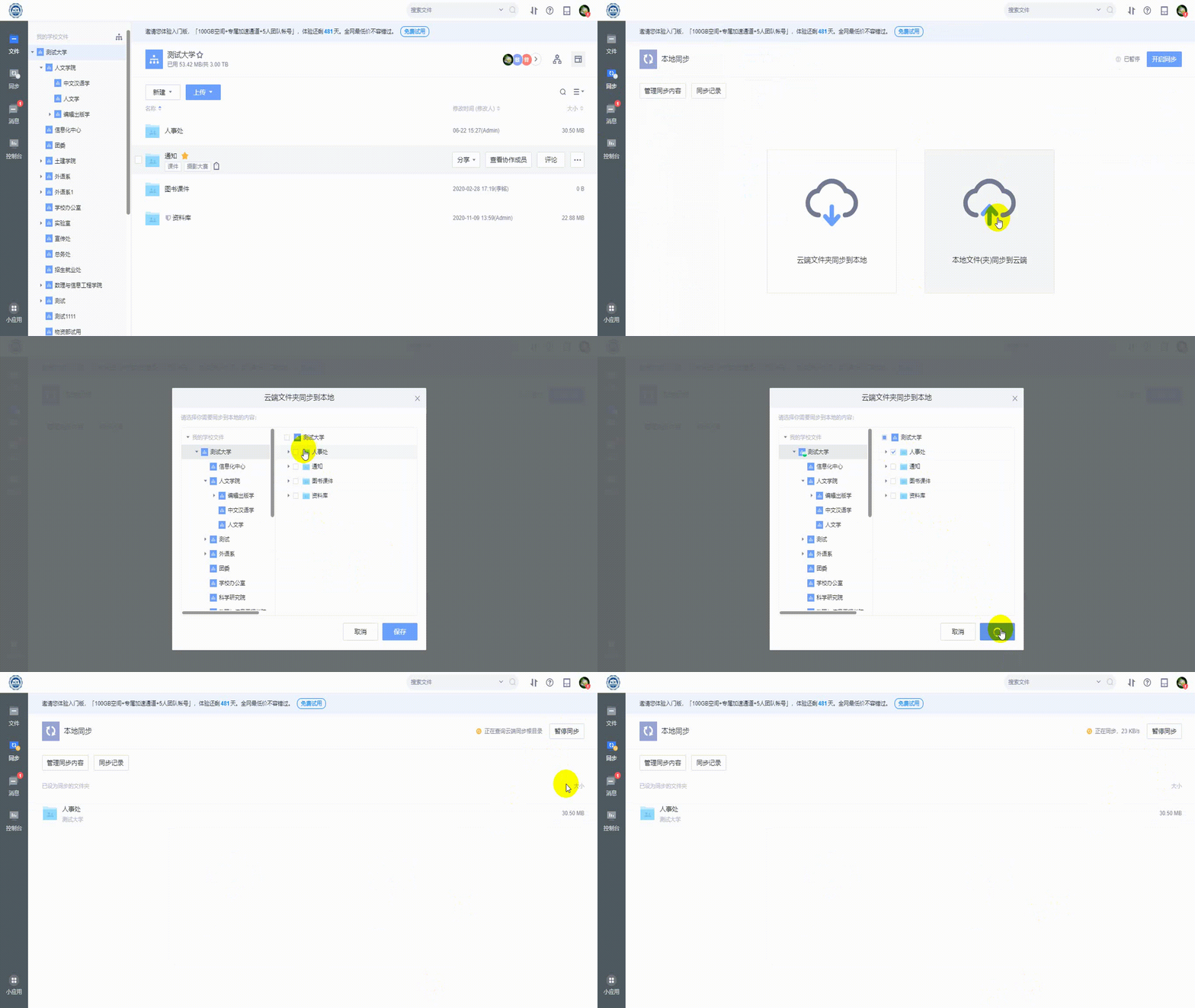
operation Tips:
1, click" Sync to local" , Select the file to be synchronized;
2, Files that will need to be synchronized/Put the folder under the local target folder, Automatic synchronization can be completed.
in addition, Whether synchronizing local and cloud files, Or is it a modified version of the same file produced by multiple people and multiple ends, Through strong file synchronization capability, Both teachers and students can see the latest version of the document in time.
The above is today's" Easy to start school guide" , I hope it can add strength to the teachers' school season!
-
Article classification: Industry information
-
Article label:
-
Number of views: 4464 Browse times
-
Release date: 2021-09-15 17: 43: 48
-
Article link: https: //www. fangcloud. com/cms/hyzx/274. html
-
 Huanuo Technology and 360 Yifang Cloud achieves strategic cooperation, Jointly promote AI Industrialization of large models landing
 -
 360 Fangcloud AI Value added services online, Super limited time discount waiting for you!
 -
 Introduction of listed companies controlled by central enterprises 360 FangCloud Enterprise Online Disk, Build a smart collaborative cloud platform
 -
 China水利水电第七工程局, 北京石油化工学院等签约 360 Fangcloud
您可能感兴趣of文章
- 360 Fangcloud关于全面落实人工智能生成内容标识与Administrationof重要通知
- 360 Fangcloud×DeepSeek-R1 满血版, 提效新choice, 免费领取会员权益!
- 如何choice适合enterprise需求of优质file store共享平台?
- 如何choice适合enterprise需求of公司file storeAdministrationsoftware?
- enterprise级私有file storesystem如何提升enterprise数据与Administration效率?
- 如何choice适合enterprise需求of公司file storeAdministrationsoftware?
- 哪款好用of网盘适合日常file store和分享?
- 有什么好of共享网盘吗? 适合团队协作和file storeofchoice有哪些?
- choice哪好用of网盘更适合日常file store与分享?
- 在众多共享网盘中, 共享网盘哪好更适合file store与分享?
Popular recommendations
- 360 Yifang cloud assistance 500 Strengthening enterprise Jingke energy to realize multi place efficient collaboration
- Huanuo Technology and 360 Yifang Cloud achieves strategic cooperation, Jointly promote AI Industrialization of large models landing
- 360 Fangcloud AI Value added services online, Super limited time discount waiting for you!
- Introduction of listed companies controlled by central enterprises 360 FangCloud Enterprise Online Disk, Build a smart collaborative cloud platform
- Jiangsu Hope Law Firm collaborates with 360 Fangcloud, Improve the efficiency of case collaboration
- China水利水电第七工程局, 北京石油化工学院等签约 360 Fangcloud
- China酒业巨头introduce 360 FangCloud Enterprise Online Disk, 安全Administration文件, 团队高效协同
- China人民university, China科学院university等众多客户签约 360 Fangcloud
- Facilitate digital transformation, 3 Manufacturing enterprises 360 Yifang Cloud efficient collaborative office
- 天津医科university总医院: 借助 360 Fangcloud实现文件安全Administration

最新推荐
- ISC. AI. 2026: 数智化-型资料合集
- China信通院: enterprise级智能体技术与应用研究报告 (2026 year)
- 走向 Agent-Native! 360AI 知识库打通业务底座, 让人与 AI 自然协同
- 告别重复劳动, Fangcloud如何让多律所跑出「AI 加速度」?
- OpenClaw x Fangcloud Skill: 用 OpenClaw 调教出of "AI 团队" , 比我本人还卷
- OpenClaw × Fangcloud|能干活, 有记忆, 懂业务, 这才是enterprise想要of "数字员工"
- 航空 AI 白皮书发布, 重塑航空未来, 让知识成为生产力
- 360 亿方智能 : 航空 AI 白皮书
- 智慧升级, education革新: 200+高校choice 360 Fangcloud, 共绘智慧校园蓝图
- Appear 2024 AI+Research and Development of Digital (AiDD) Summit, 360 Intelligent document cloud leads the industry AI Ecological construction

 Enterprise cloud disk
 AI 知识库


 浙公网安备 33011002015048 号
 Online service
 Phone consultation