



















One document 100 Large project of human collaboration, 360 Fangcloud「Fusion Document」release!
What is the essence of enterprise collaborative office? The answer is「connect」. Connected by, Connection data, Connecting office scenarios.
Thanks to various emerging technologies, 「connect」Unlimited possibilities for all industries:
Connecting different virtual worlds is「Metaverse」;
Connecting data at different levels「middleground」;
The online and offline consumption demand of the connecting line is「O2O」;
. . .
that, how「connect」Such as files, which carry massive business content, Tools with circulation attribute, Empowering enterprises?
360FangcloudNewly launched「Fusion Document」, Transfer enterprise personnel, Business data, Cloud diskfile, Organically organize collaborative messages, Render in the same document, Facilitate efficient and easy teamwork.

one
What is a fusion document?
"
Fusion Document
It is a new light document
Provide a unified team online collaboration space for project members.
Before the project startsOutput project data, Develop project plan; Project under implementationReal time communication and cooperation, Follow up to do tasks; After project completionCollect project data, Sort out the project review, etc, All can be completed in one fusion document.

two
Typical application scenarios
The business applicable scenarios of the integrated document include but are not limited to:
1) Light synergy (Lightweight tasks/Project Kanban) ;
2) Light portal (class wiki Knowledge site for) .
stayConference collaboration, project management, Work report, Knowledge sharing, etcScenarios, Fusion documents can help enterprises connect people, Business data, Office Scenarios, Easy collaboration, Improve efficiency.
Online conference
Induction training for new employees
three
How to Use Fusion Documents?
Fusion documents include various convenient collaboration methods, Three steps to play.
1
Create fusion document
(1) New Fusion Document
Note that, Need to be in theCloud diskCreate a new fusion document in the collaboration folder of, Otherwise, it cannot be included in the fusion document@others~
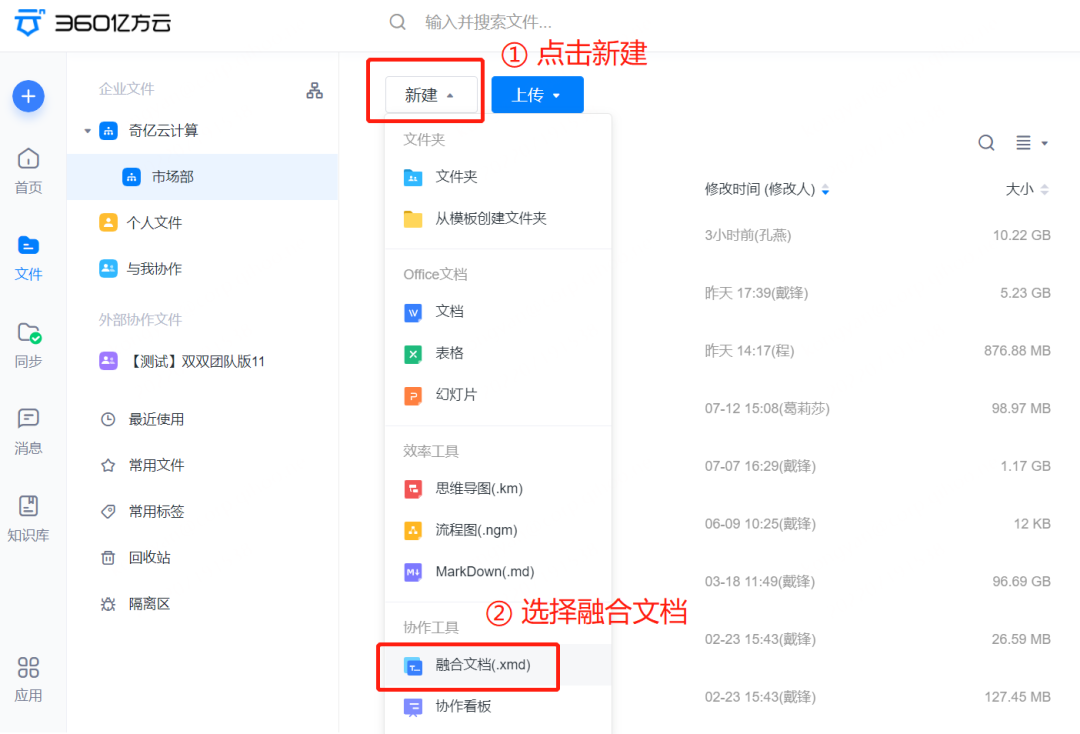
(2) Select Smart Template
As needed, Select different fusion document templates, Insert the business content framework that we need to use at the speed of one-button per second.
2
Edit Fusion Document
(1) Edit text content
In the process of editing text content, Font can be set, Font size, colour, Alignment, Sort list, etc.

(2) Insert a file or folder in the cloud disk
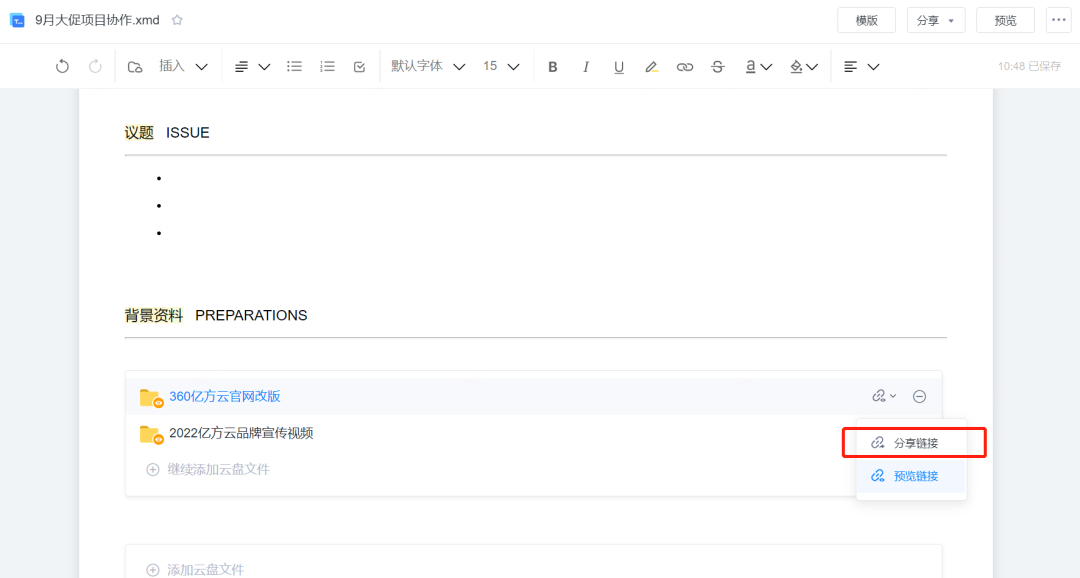
Can be inserted directly in the fusion document 360FangcloudEnterprise cloud diskFiles or folders in, Other people click the inserted file, You can directly jump to the file location, View Details.
Ps: After inserting the cloud disk file, If the person viewing the file is not in the collaboration folder corresponding to the cloud disk file, But you also need to check, Then you can switch the file viewing status to sharing link.
(3) Insert Picture or Table
in addition, Project members can also directly insert pictures or tables into the merged document, Make all kinds of data clear on the same interface, No need to open multiple files to switch back and forth.
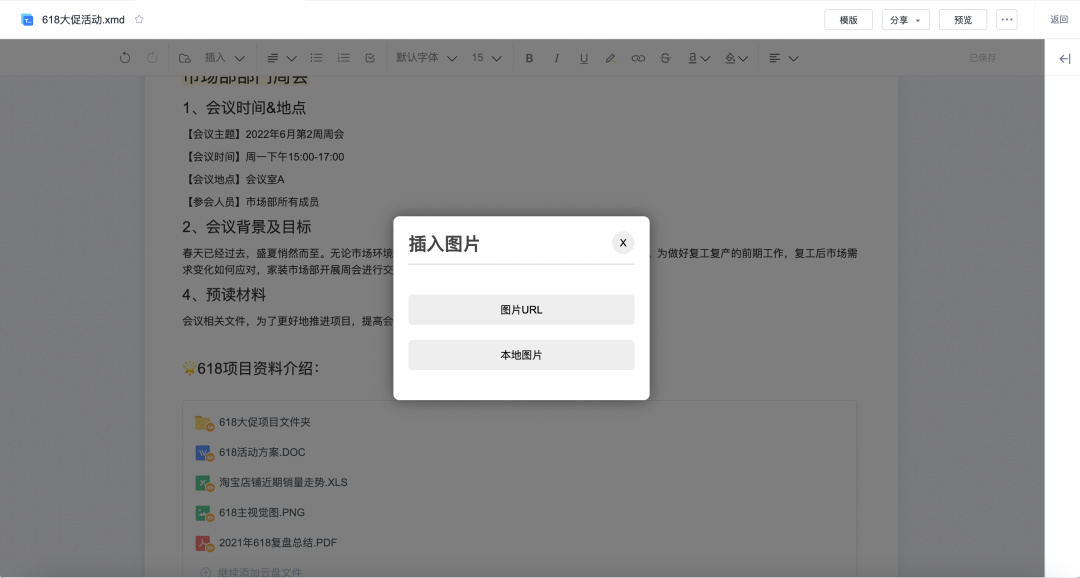
Ps: When inserting a picture in a merged document, You can also use shortcut keys ctrl+c; ctrl+v Copy and paste~
3
Collaborate by fusing documents
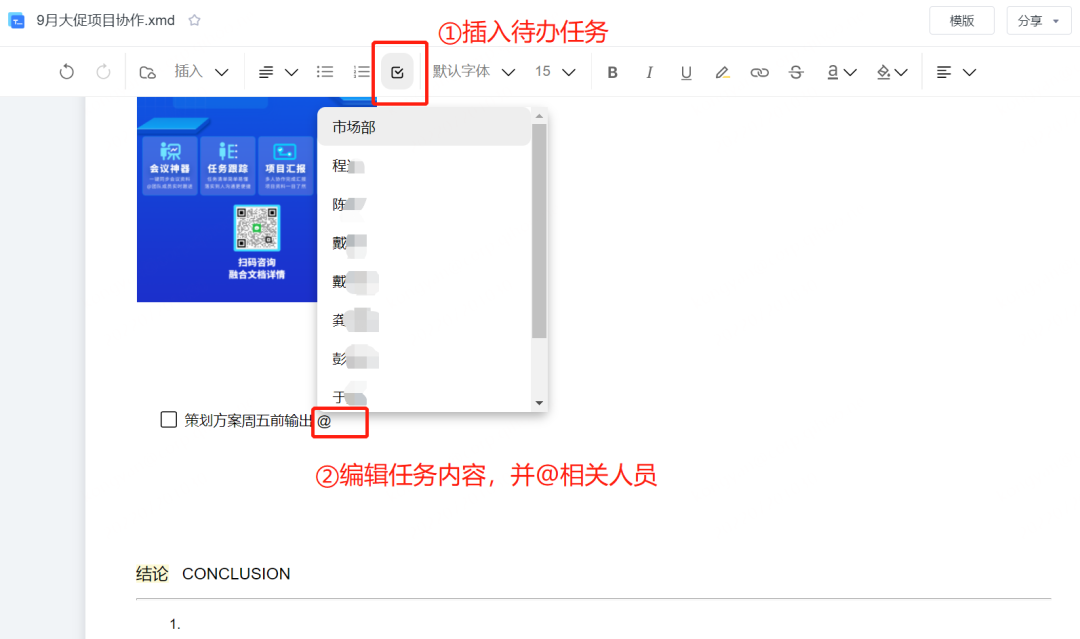
(1) Create to-do task, and@Related Members
This allows task assignment, cover@Members of can receive real-time message alerts, View the to-do tasks you have received.
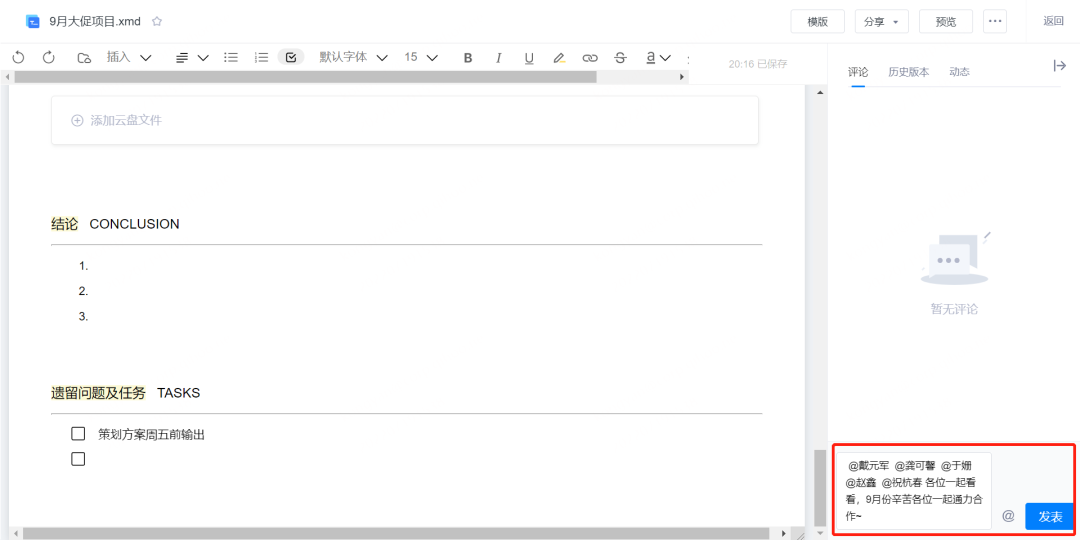
(2) Post message comments
and 360 Like other files in Yifang Cloud, We can alsoComment on a fusion document, and@Corresponding collaboration members. cover@% of people can receive message alerts in real time, And reply to the message.
(3) Sharing fusion documents
We canShare fusion documents to colleagues or external partners, The other party can click the sharing link to preview online.
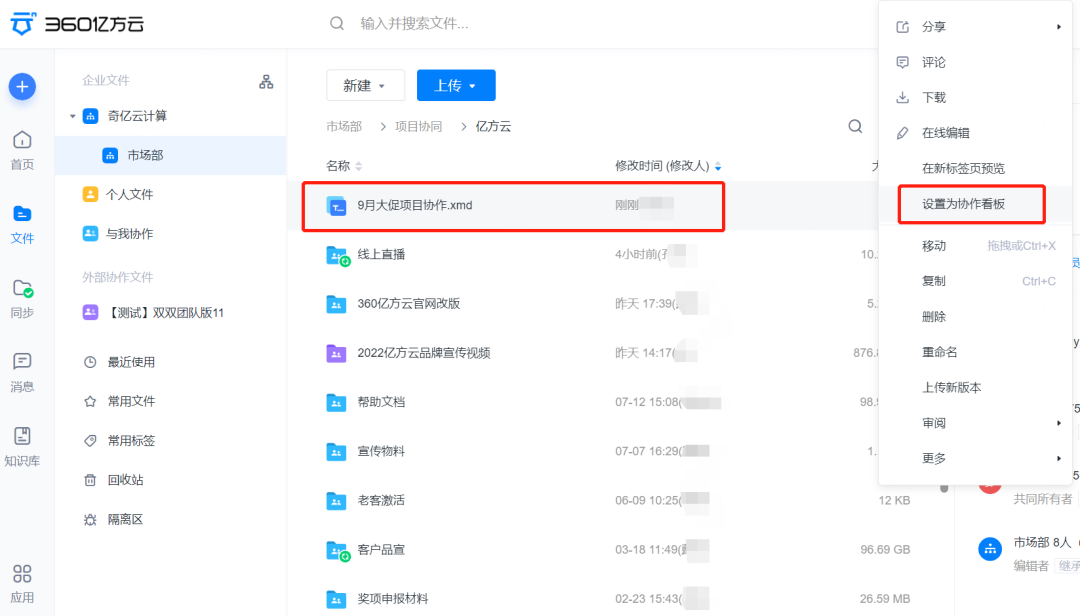
(4) Create collaboration Kanban
Fusion documents can be set as collaboration kanban, In this way, everyone in the collaboration folder can see the fusion document immediately, Applicable to important and urgent project collaboration scenarios.
That's all about the fusion document~
At present, the integrated document function is gradually opening up in batches, If your team/Enterprises are interested in merging documents, You can contact us separately to open. You can dial360 Yifang Cloud official customer service hotline (400-993-9050) that will do, it's fine tooScan the QR code in the poster aboveconsulting service~
-
Classification: Product trends
-
Views: 5132 Browses
-
Release Date: 2022-07-27 18: 30: 16
-
Link to this article: https: //www. fangcloud. com/cms/chanpindongtai/542. html
-
 华诺科技与 360 Fangcloud达成战略合作, 共推 AI 大模型产业化落地
 -
 360 Fangcloud AI 增值服务上线, 超大限时优惠等你来!
 -
 Introduction of listed companies controlled by central enterprises 360 FangCloud Enterprise Online Disk, Build a smart collaborative cloud platform
 -
 中国水利水电第七工程局, 北京石油化工学院等签约 360 Fangcloud
您可能感兴趣的文章
- 企业 AI 知识库: one半是火焰, one半是废品
- 8 月&9 月Products更新回顾|让资料更好找, 让知识用起来
- 360 制造行业知识管理Solutions
- 新疆喀什地区某县委机关与 360 亿方智能成功签约, 共同推进政务办公数字化升级!
- 放假前最后 10 分钟, 把散落的工作资料收进知识库
- 360 亿方智能提供全程技术支持, 助力泉州市数据应用职业技能竞赛圆满举办
- 企业关注的不再是 "how存储file" -- IDC 解读中国智能企业内容与知识平台市场
- 从 "能回答" 到 "敢用于业务" : Enterprise Knowledge Basehow建立可信链路?
- IDC 中国智能企业内容与知识平台市场额: 360 亿方智能私有化市场第two, 增速第one!
- 京新药业携手 360 亿方智能, 共建 AI 知识库, 让医药知识常用常「新」
Popular recommendations
- 360 Yifang Cloud helps 500 Strong Enterprise Jinke Energy to Achieve Multi site Efficient Collaboration
- 华诺科技与 360 Fangcloud达成战略合作, 共推 AI 大模型产业化落地
- 360 Fangcloud AI 增值服务上线, 超大限时优惠等你来!
- Introduction of listed companies controlled by central enterprises 360 FangCloud Enterprise Online Disk, Build a smart collaborative cloud platform
- 江苏霍普律师事务所携手 360 Fangcloud, 提升案件cooperation效率
- 中国水利水电第七工程局, 北京石油化工学院等签约 360 Fangcloud
- 中国酒业巨头introduce 360 FangCloud Enterprise Online Disk, 安全管理file, 团队高效协同
- 中国people民university, 中国科学院university等众多客户签约 360 Fangcloud
- Facilitate digital transformation, 3 Manufacturing enterprises 360 Yifang Cloud efficient collaborative office
- 天津医科university总医院: 借助 360 Fangcloud实现file安全管理

最新推荐
- ISC. AI. 2026: 数智化-型资料合集
- 中国信通院: 企业级智能体技术与应用研究报告 (2026 year)
- 走向 Agent-Native! 360AI 知识库打通业务底座, 让people与 AI 自然协同
- 告别重复劳动, Fangcloudhow让多律所跑出「AI 加速度」?
- OpenClaw x Fangcloud Skill: 用 OpenClaw 调教出的 "AI 团队" , 比我本people还卷
- OpenClaw × Fangcloud|能干活, 有记忆, 懂业务, 这才是企业想要的 "数字员工"
- 航空 AI 白皮书release, 重塑航空未来, 让知识成为生产力
- 360 亿方智能 : 航空 AI 白皮书
- 智慧升级, 教育革新: 200+高校选择 360 Fangcloud, 共绘智慧校园蓝图
- Appear 2024 AI+研发数字 (AiDD) 峰会, 360 智能file云引领行业 AI 生态建设

 Enterprise cloud disk
 AI 知识库


 浙公网安备 33011002015048 号
 Online service
 Phone consultation