



















New functions online | Yifang cloud can also be created online, edit「flow chart」la!
Follow「PDF transformation」After function, FangcloudThere are new features online again!
Recently, my sharp eyed friend may have noticed, 「newly build」There is a new figure in the drop-down menu of, It is: 「flow chart」!
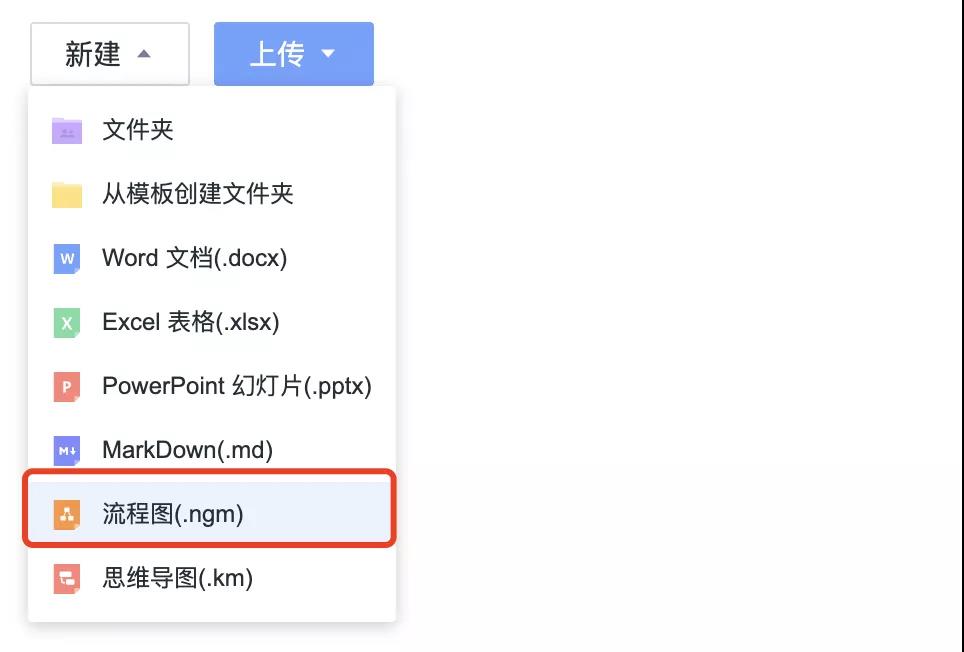
Used below 1 It will take you a minute to quickly understand this efficient artifact.
"Baidu Encyclopedia" : A flowchart is the flow of information through a system, Graphical representation of view flow or component flow. In the enterprise, The flow chart is mainly used to illustrate a process. This process can be the process flow of the production line, It can also be a necessary management process to complete a task.
Simply put, The advantage of flow chart is that it can show the project intuitively and clearly, Every step of the business, After all, a thousand words are not as direct as a picture.
of course, The application of flow charts does not stop at work, There are many flow chart masters who will also use them as their own reading notes, For example, netizens@HelloMrLin Just draw a flow chart Romance of the Three Kingdoms Person relationship diagram, The complex romance of the Three Kingdoms instantly became clear.
In actual work, I am learning, The application scenario of flow chart is very wide. For example, after-sales process, E-commerce activity process, etc, The original introduction document of more than ten pages, Now you can clearly show each link with a picture.
Previously shared flow chart:
staff Tony Edit the flow chart with third-party software first, Considering the preview problem, Choose a common image format when exporting and downloading, And then by nailing, Send it to the boss via wechat Vivian, boss Vivian Mark the modification comments and send them back to Tony, then Tony Repeat the above process after modification. . .
Now share the flow chart:
Tony stayFangcloudupper「newly build」flow chart, No need to export after editing, direct「share」to Vivian, Vivian Online preview without downloading, Edit flowchart file.
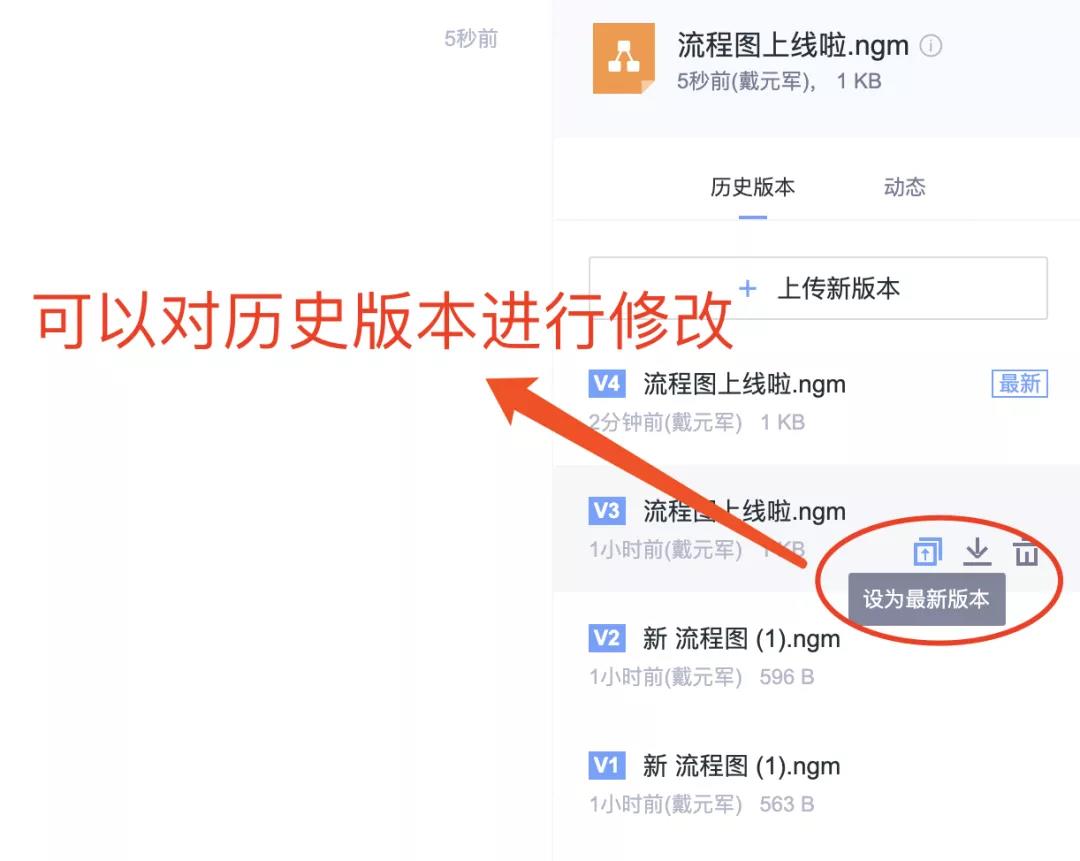
Fangcloud「flow chart」In addition to common functions, It can also use the complete Yifang cloud file capability, Include online preview, Historical version, File sharing, Document comments, etc!
We take the review of project flow chart documents as an example.
First we pass「comment」function, Under the edited flow chart@Related colleagues view.
Colleagues' ability to preview Online, No need to convert file format, View flow chart files directly online.
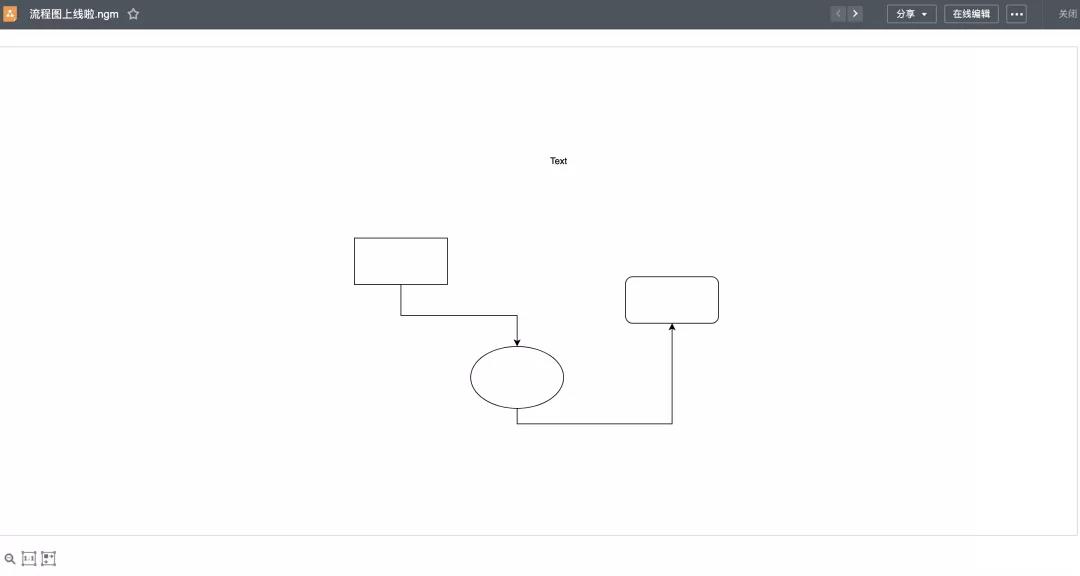
After collecting feedback from colleagues, We can modify the flow chart file online, Automatically generated after saving「Historical version」. If you are not satisfied with the modification result, Can still pass「Historical version」Back at any time.
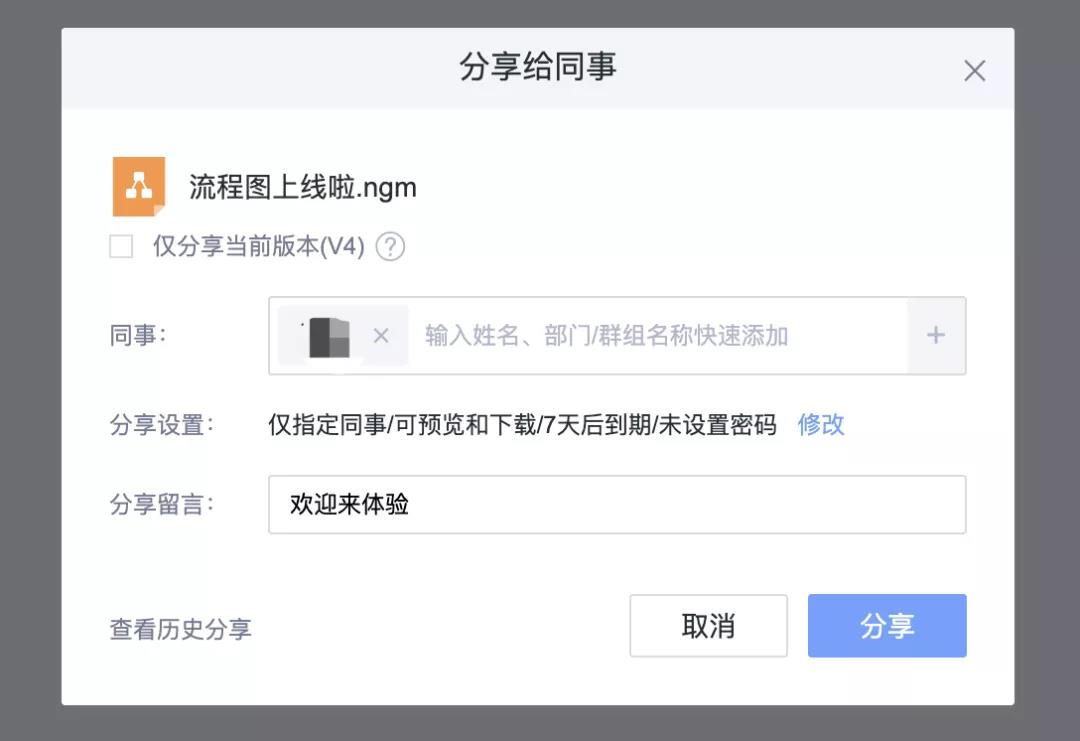
last, We'll pass again「share」function, Share the revised flow chart with the relevant project leaders.
Just 4 step, You can complete a flow chart on Yifang cloud.
① stay「newly build」Next find「flow chart」, Click Create, choice「Create and edit Online」.
② After entering the editing state, We can start "Draw a picture" la~
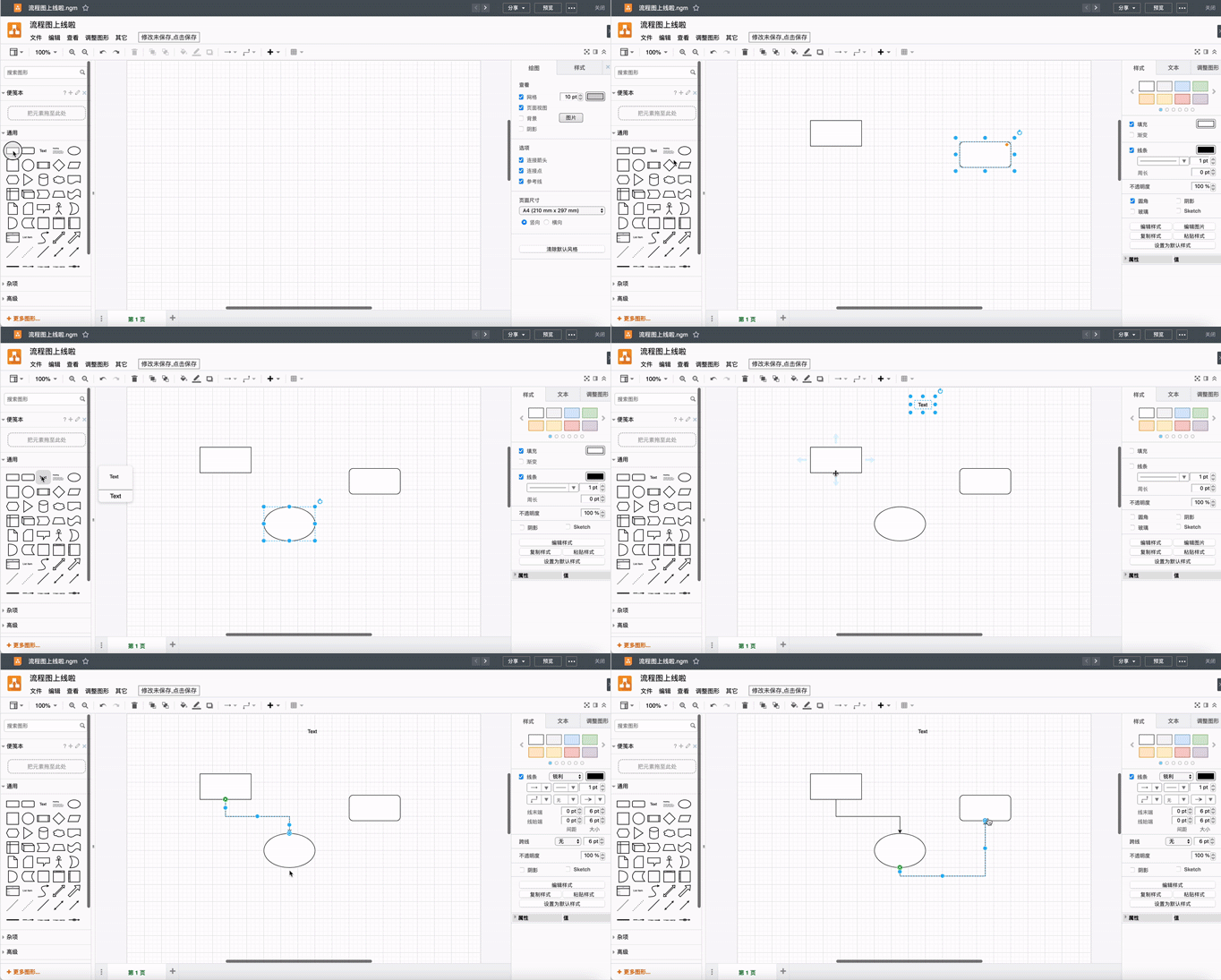
At the top of the editing interface are toolbars, menu bar, On the lower left is the graphics toolbar, Blank panel in the middle, That is, the drawing area we edited, On the right is the format panel. Rich functions, You can get to know it by yourself.
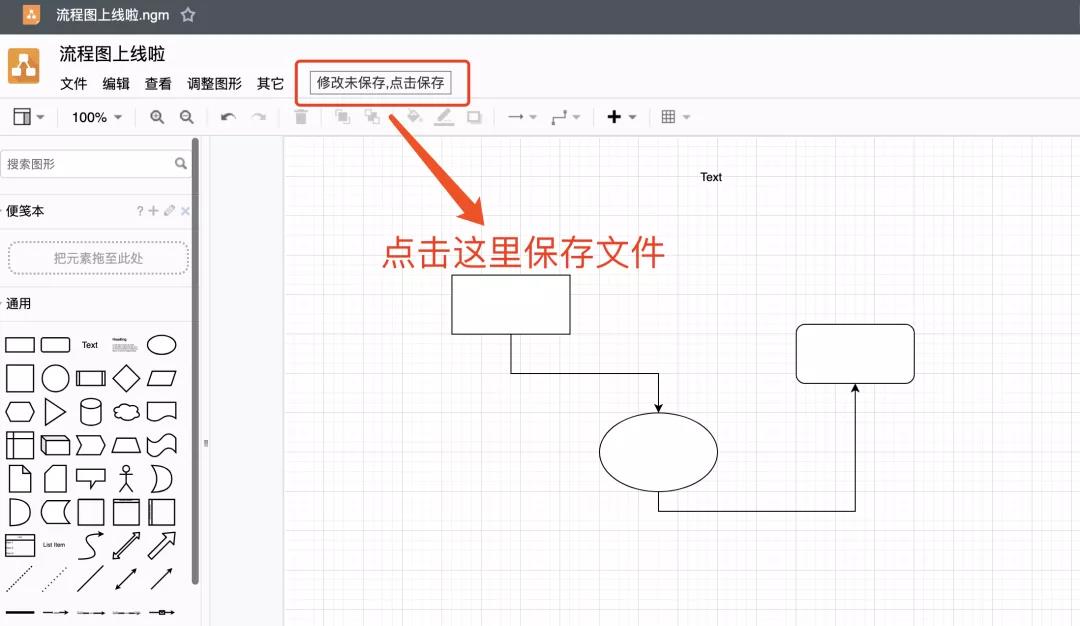
③ After editing, Click the Save button above, You can save the file.
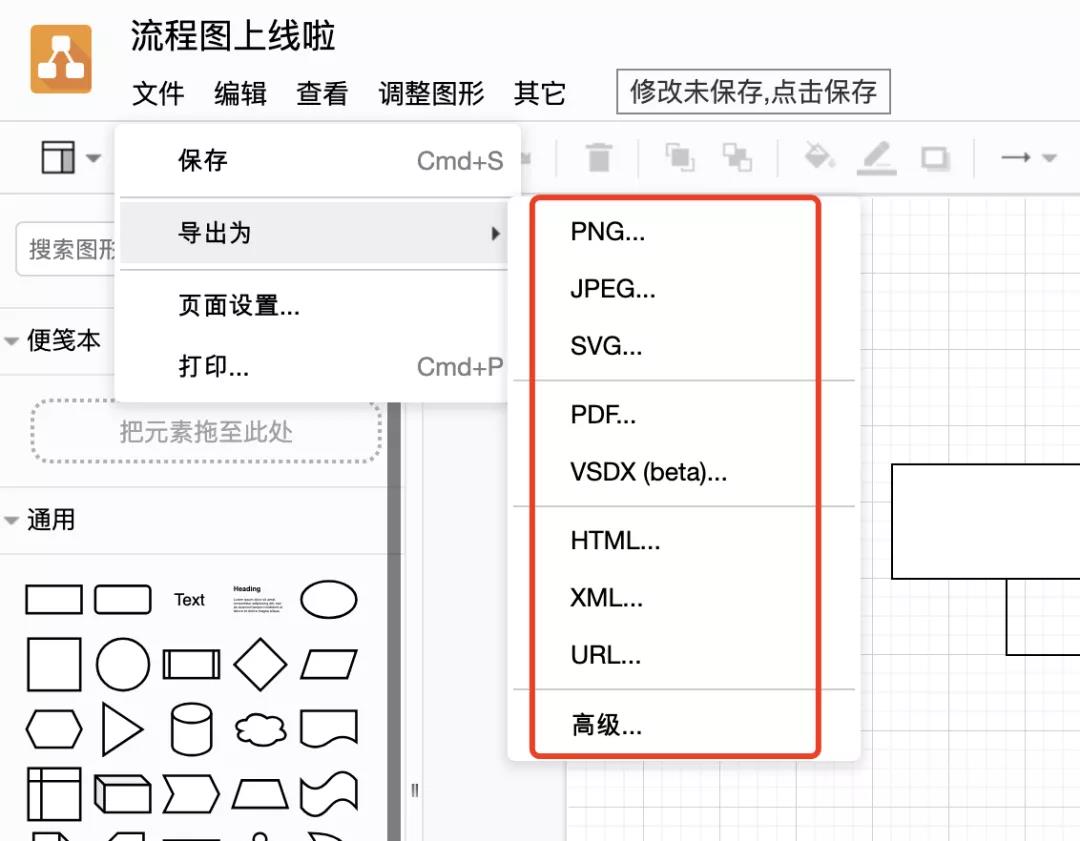
④ If you need to export, Click the upper left corner in turn「file」-「Export as」, Then select the format, include PNG, JPEG, SVG And other common formats.
These operations are simple for those who are familiar with the flow chart, Even if I haven't touched it before, Believe in yifangyun「flow chart」It can also help you get started quickly.
The above is Yifang cloud「flow chart」Quick start introduction to, In addition, there are some small details to pay attention to in use.
- Who can use the flowchart function?
answer: Gongyouyun, Starter Edition, Advanced Edition, All flagship versions are available, Trial users can also use all functions normally.
- Hybrid cloud, Can VPC enterprises use flow charts?
answer: Due to the different deployment environment of each enterprise, If the enterprise has needs, You can contact the service consultant separately for details.
- Does the flow chart support online editing by multiple people at the same time?
answer: Currently not supported. When the document is opened by the user, The document will be locked.
-
Article classification: Product trends
-
Number of views: 6266 Browse times
-
Release date: 2021-10-22 17: 23: 48
-
 Huanuo Technology and 360 Yifang Cloud achieves strategic cooperation, Jointly promote AI Industrialization of large models landing
 -
 360 Fangcloud AI Value added services online, Super limited time discount waiting for you!
 -
 Introduction of listed companies controlled by central enterprises 360 FangCloud Enterprise Online Disk, Build a smart collaborative cloud platform
 -
 China水利水电第七工程局, 北京石油化工学院等签约 360 Fangcloud
您可能感兴趣的文章
- 360 Fangcloud关于全面落实人工智能生成内容标识与Administration的重要通知
- 360 Fangcloud×DeepSeek-R1 满血版, 提效新choice, 免费领取会员权益!
- 如何choice适合enterprise需求的优质file store共享平台?
- 如何choice适合enterprise需求的公司file storeAdministrationSoftware?
- enterprise级私有file storesystem如何提升enterprise数据与Administration效率?
- 如何choice适合enterprise需求的公司file storeAdministrationSoftware?
- 哪款好用的网盘适合日常file store和share?
- 有什么好的共享网盘吗? 适合团队协作和file store的choice有哪些?
- choice哪好用的网盘更适合日常file store与share?
- stay众多共享网盘中, 共享网盘哪好更适合file store与share?
Popular recommendations
- 360 Yifang cloud assistance 500 Strengthening enterprise Jingke energy to realize multi place efficient collaboration
- Huanuo Technology and 360 Yifang Cloud achieves strategic cooperation, Jointly promote AI Industrialization of large models landing
- 360 Fangcloud AI Value added services online, Super limited time discount waiting for you!
- Introduction of listed companies controlled by central enterprises 360 FangCloud Enterprise Online Disk, Build a smart collaborative cloud platform
- Jiangsu Hope Law Firm collaborates with 360 Fangcloud, Improve the efficiency of case collaboration
- China水利水电第七工程局, 北京石油化工学院等签约 360 Fangcloud
- China酒业巨头introduce 360 FangCloud Enterprise Online Disk, 安全Administrationfile, 团队高效协同
- China人民university, China科学院university等众多客户签约 360 Fangcloud
- Facilitate digital transformation, 3 Manufacturing enterprises passed 360 Yifang Cloud efficient collaborative office
- 天津医科university总医院: 借助 360 Fangcloud实现file安全Administration

最新推荐
- ISC. AI. 2026: 数智化-型资料合集
- China信通院: enterprise级智能体技术与应用研究报告 (2026 year)
- 走向 Agent-Native! 360AI 知识库打通业务底座, 让人与 AI 自然协同
- 告别重复劳动, Fangcloud如何让多律所跑出「AI 加速度」?
- OpenClaw x Fangcloud Skill: 用 OpenClaw 调教出的 "AI 团队" , 比我本人还卷
- OpenClaw × Fangcloud|能干活, 有记忆, 懂业务, 这才是enterprise想要的 "数字staff"
- 航空 AI 白皮书发布, 重塑航空未来, 让知识成为生产力
- 360 亿方智能 : 航空 AI 白皮书
- 智慧升级, 教育革新: 200+高校choice 360 Fangcloud, 共绘智慧校园蓝图
- Appear 2024 AI+Research and Development of Digital (AiDD) Summit, 360 Intelligent document cloud leads the industry AI Ecological construction

 Enterprise cloud disk
 AI 知识库


 浙公网安备 33011002015048 号
 Online service
 Phone consultation